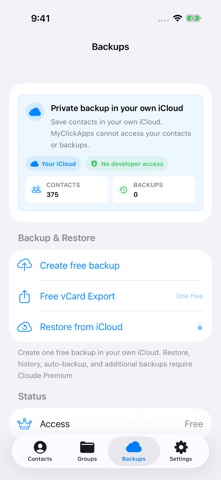
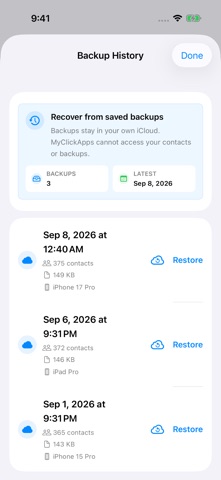
Back up your contacts before switching iPhones, cleaning your address book, or making important changes. Cloude saves dated backups in your own iCloud account, where MyClickApps cannot access your contacts or backups. START WITH ONE FREE BACKUP If you have not used your first free backup and have no existing Cloude backups, create one contact backup in your own iCloud. You can also try one free local vCard export. RESTORE FROM A BACKUP YOU SAVED With Cloude Premium, choose a dated backup and restore missing contacts, or replace your contacts after confirmation. Replace All saves a local recovery copy first and is unavailable across multiple contact accounts. Recovery requires a previously saved backup; Cloude cannot recover contacts that were never backed up. KEEP YOUR CONTACTS READY - Back up contacts to your own iCloud account - Restore from saved backup history with Premium - Search names, phone numbers, emails, and groups - Review contact cards and browse groups - Export contacts as vCard PRIVATE CONTACT BACKUPS Your contacts are not uploaded to MyClickApps. Backups stay in your own private iCloud / CloudKit account. MyClickApps cannot access your contacts or backups. iCloud backup and restore require access to your iCloud account; use the same account to access your Cloude backups on another device. FREE AND PREMIUM Diagnostic and coarse usage data help us improve reliability, as explained in our Privacy Policy. Your first eligible iCloud backup and one local vCard export are free. Restore, backup history, automatic backup, additional backups, and further exports require Cloude Premium. Choose monthly, yearly, or lifetime access. Lifetime is a one-time purchase with no renewal. When automatic backup is enabled, Cloude checks for a weekly backup when you open the app. For subscriptions, payment is charged to your Apple ID account at confirmation. Subscriptions renew automatically unless cancelled at least 24 hours before the end of the current period. Manage or cancel subscriptions in your App Store account settings. Privacy Policy: https://www.myclickapps.com/privacy Terms of Use (EULA): https://www.apple.com/legal/internet-services/itunes/dev/stdeula/ Support: https://www.myclickapps.com/contact
Productivity · iPhone, iPad · Free
Rating: 5.0 out of 5, based on 3 user ratings.