
Screenshots


About Deck Buddy: Remote Deck
Deck Buddy turns your iPhone or iPad into an intelligent control deck for your Mac. It’s more than a “shortcut remote” - it’s a full system for fast, context-aware control that adapts to whatever you’re doing.
≋≋ Always the right buttons ≋≋
DeckBuddy can switch layouts automatically based on the app currently active on your Mac. Use one deck for Xcode, another for Safari, another for your creative tools - and let DeckBuddy keep up as you switch.
≋≋ Two ways to work ≋≋
• Auto Mode: DeckBuddy follows the active Mac app and loads the matching deck.
• Manual Mode: lock a specific deck whenever you want consistent controls.
≋≋ Built for real workflows ≋≋
• Trigger keyboard shortcuts remotely from your iPhone
• Run advanced actions with AppleScript on macOS
• Pair fast with a 6-digit code and remember trusted devices
• Discover your Mac automatically via Bonjour (no IP typing)
• Capture a shortcut from your Mac keyboard and assign it to a button
• Create decks with multiple pages, custom rows/columns, and iPad layouts
• Personalise button styles: colours, borders, system icons, and your own SVG/PNG
• Start quickly with ready-made presets for popular use cases
• Import/export backups of your profiles and actions
≋≋ Mac setup that’s actually clear ≋≋
Deck Buddy includes a guided macOS onboarding screen with setup steps, Accessibility permissions, and an option to launch at login.
If you love speed, shortcuts, streaming, or creative work - DeckBuddy is a great one to try
≋≋ Version 1.0 ≋≋
• First release of DeckBuddy
• Auto/Manual profiles, shortcut buttons, AppleScript actions
• Presets, custom layouts, and backup import/export
≋≋ SUBSCRIPTION INFORMATION ≋≋
• Enjoy your first 2 weeks free with an annual subscription
• Enjoy your first 3 days free with a monthly subscription
• Payment will be charged to your Apple ID account at confirmation of purchase
• Your subscription renews automatically unless canceled at least 24 hours before the end of the current billing period
• You can manage or cancel your subscription anytime in your Account Settings
• Pricing may vary by country or region and will be shown before purchase
https://www.apple.com/legal/internet-services/itunes/dev/stdeula/
AVALW Coverage
Not yet mentioned in AVALW articles.
Similar apps


 Phone by GoogleGoogle LLCReliable phone calls with spam protection, caller ID and more helpful features★ 4.4 52440k


 Google Play servicesGoogle LLCGoogle Play services - Google services for Android apps★ 4.3 44573k



 Call of Duty®: Modern Warfare® 4 (Windows)Activision Publishing Inc.War erupts on the Korean Peninsula as North Korea launches a full-scale invasion that threatens to destabilize the world in Call of Duty®: Modern Warfare® 4. A ★ 4.3 16579k


 gov.brServiços e Informações do BrasilGov.br is a means of user access to digital public services.★ 4.6 14047k


 MyTelkomsel – Buy InternetTelkomselBuy credit, internet quota, streaming, game voucher & get cashback with e-wallet★ 3.8 12353k


 myIM3: Data Plan & Buy PackageIndosat Ooredoo HutchisonCheck balance & quota, detect & block spam, exchange IMPoin only on myIM3★ 4.4 11302k


 Files by GoogleGoogle LLCClean up your phone, find files, play media, and share files offline★ 4.5 9097k


 CNH do BrasilServiços e Informações do BrasilDigital driver's license and vehicle registration certificate, first driver's license, traffic violation and vehicle information.★ 4.9 8390k
More by this developer


 BookTeleport: eBook TransferDaniel MiaraBookTeleport makes it easy to move your own e-books from your Mac to a USB-connected e-reader. Choose a book or simply drag it into the app. BookTeleport prepar-

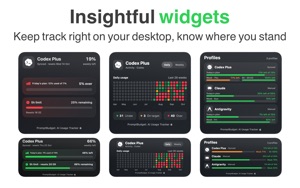

 PromptBudget: AI Usage TrackerDaniel MiaraPromptBudget helps developers pace a weekly AI usage allowance from the Mac menu bar using a compact menu app, detailed or the main app. Keep your computer awak-


 Connect My NASDaniel MiaraConnect your NAS without the usual setup hassle. Connect My NAS keeps the folders you use on your network storage available and reconnects them automatically wh-


 Spin & Draw: Drawing GuesserDaniel MiaraTurn any table into a drawing game night. Spin & Draw is a pass-the-phone drawing and guessing game for 2–6 players. Grab some paper, a notebook or a whiteboard-