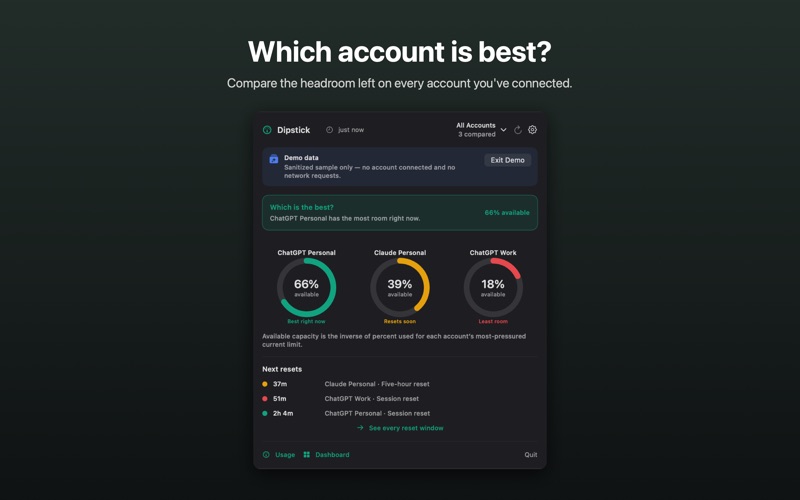
See your ChatGPT and Claude limits before you hit them. Dipstick lives in your menu bar and shows how much of your AI plan you've actually used — every rate-limit window your plan reports, how fast you're burning through it, and when it resets. PACE, NOT JUST PERCENT 90% used on the last day of the week is fine. 40% used on day one is a problem. Dipstick compares your usage to how far you are through the window, and the gauge color tracks whether you'll make it to the reset — not the raw number. IN THE MENU BAR • A live gauge for your selected usage window • Every limit your plan reports: weekly, session, code review, and model-specific windows • Countdown to each scheduled reset, plus credits and extra-usage balances • Saved one-time limit resets for ChatGPT and Claude, with saved and currently usable counts; Claude also shows when no resets are saved or availability cannot be verified • A burn-rate projection once enough history accumulates • Usage history chart (12h / 24h / 7d / 30d) CONNECT YOUR WAY • Sign in to ChatGPT or Claude on the provider's own page, inside an isolated session • Or point at an existing local Codex sign-in file (read-only) • Multiple accounts, kept fully separate — switch without signing anything out PRO — ONE-TIME $4.99, NOT A SUBSCRIPTION • Dashboard with 90 days of analytics: tokens by model and surface, activity heatmap, skills, plugins, and code written • Custom limit alerts at any threshold, per window and per account • Optional weekly summary digest • CSV export Every feature is free for the first 10 days. After that, the menu bar gauge, pace, current limits, local history, and account switching stay free forever. PRIVATE BY DESIGN Your data travels from your Mac to your provider and nowhere else. No servers, no analytics, no tracking, no app account to create. Usage history is stored locally, and you can export or delete it at any time. Dipstick is independent third-party software, not affiliated with, endorsed by, or sponsored by OpenAI or Anthropic. It displays usage information from your own account; what appears depends on your plan. Detailed 90-day analytics require a ChatGPT account connected via a Codex file. Requires macOS 14 or later.
Utilities · iPhone, iPad · Free