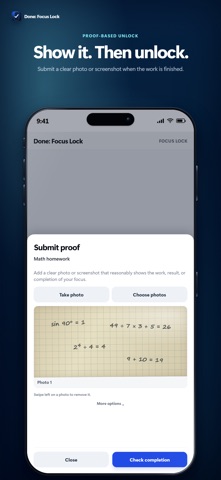
Done: Focus Lock is designed to keep distracting apps blocked until you upload proof that your task is finished. An emergency override is available when you need to end a lock without accepted proof. Name what you want to focus on and start a focus lock. Done uses Apple Screen Time to block the apps or categories you select. When you finish, upload a photo or screenshot. If it reasonably shows the task is complete, your apps unlock. PROOF-BASED COMPLETION A timer can run out while the work is still sitting there. Done normally keeps the lock active until your upload shows the task is complete. An emergency override can end the lock without accepted proof and is recorded in Progress. CHOOSE WHAT TO BLOCK Done can block almost any app. Select All Apps for the strongest lock, or leave the apps you need for the task available. TRACK WHAT YOU FINISH Progress keeps your completed tasks and focus time together. Streaks and challenges help you keep showing up. Use Done for homework, studying, writing, chores, paperwork, and personal projects. Done Pro removes the free-plan focus-lock limit for normal personal use. Subscription prices, trial eligibility, renewal terms, and any applicable service limits are shown before purchase. Manage or cancel through Apple. Terms of Use: https://donefocuslock.com/terms/ Privacy Policy: https://donefocuslock.com/privacy/ Support: https://donefocuslock.com/support/
Productivity · iPhone, iPad · Free
Rating: 5.0 out of 5, based on 1 user ratings.