
Screenshots


About Draw Easy: Trace Sketch Helper
Turn any photo into a drawing you can trace on real paper.
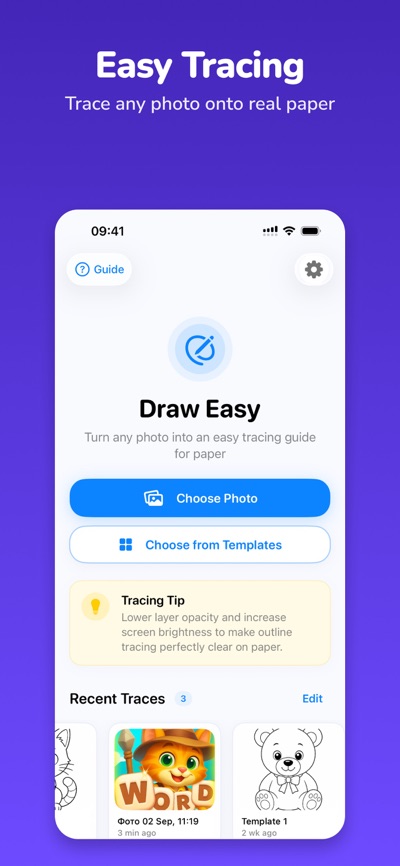
DrawEasy transforms your iPhone or iPad into a simple tracing lightbox. Choose a photo or one of the included drawing templates, adjust it on the screen, place a sheet of paper over your device, and start tracing.
It's an easy and fun way to practice drawing, create beautiful sketches, and help beginners gain confidence with every line.
HOW IT WORKS
1. Choose a photo or drawing template.
2. Resize and position the image on the screen.
3. Adjust the image for comfortable tracing.
4. Place a sheet of paper over your iPhone or iPad.
5. Lock the screen controls.
6. Trace the visible lines onto the paper.
PERFECT FOR TRACING
Zoom, move, and position your reference exactly where you need it. Once everything is ready, lock the controls so accidental touches don't move your image while you draw.
DRAW FROM YOUR OWN PHOTOS
Choose any suitable image from your photo library and use it as a reference. Trace animals, objects, characters, simple shapes, sketches, and much more.
READY-TO-TRACE TEMPLATES
Don't know what to draw? Start with one of the included simple templates designed to be easy to follow and trace.
HELPFUL DRAWING TOOLS
Use tools designed specifically for tracing:
• Zoom and position your reference
• Lock controls while drawing
• Keep the screen awake
• Adjust screen brightness
• Change image transparency
• Use a grid for easier proportions
• Mirror your reference
• Adjust the image for better visibility
MADE FOR IPHONE AND IPAD
DrawEasy works on both iPhone and iPad. A larger iPad screen makes a great tracing surface, while iPhone is perfect for smaller drawings and practicing anywhere.
GREAT FOR BEGINNERS & KIDS
You don't need drawing experience to get started. DrawEasy makes tracing simple and approachable for children, beginners, hobby artists, and anyone who wants to practice drawing by hand.
FROM SCREEN TO REAL PAPER
DrawEasy isn't about drawing with your finger on a screen. The goal is to help you create a real drawing on real paper.
Pick an image. Place your paper. Follow the lines.
Start tracing and create something you can be proud of.
https://vnorme.app/draw_easy/terms.html
https://vnorme.app/draw_easy/privacy.html
https://vnorme.app/draw_easy/eula.html
https://vnorme.app/draw_easy/support.html
AVALW Coverage
Not yet mentioned in AVALW articles.
Similar apps


 Phone by GoogleGoogle LLCReliable phone calls with spam protection, caller ID and more helpful features★ 4.4 52440k


 Google Play servicesGoogle LLCGoogle Play services - Google services for Android apps★ 4.3 44573k



 Call of Duty®: Modern Warfare® 4 (Windows)Activision Publishing Inc.War erupts on the Korean Peninsula as North Korea launches a full-scale invasion that threatens to destabilize the world in Call of Duty®: Modern Warfare® 4. A ★ 4.3 16579k


 gov.brServiços e Informações do BrasilGov.br is a means of user access to digital public services.★ 4.6 14047k


 MyTelkomsel – Buy InternetTelkomselBuy credit, internet quota, streaming, game voucher & get cashback with e-wallet★ 3.8 12353k


 myIM3: Data Plan & Buy PackageIndosat Ooredoo HutchisonCheck balance & quota, detect & block spam, exchange IMPoin only on myIM3★ 4.4 11302k


 Files by GoogleGoogle LLCClean up your phone, find files, play media, and share files offline★ 4.5 9097k


 CNH do BrasilServiços e Informações do BrasilDigital driver's license and vehicle registration certificate, first driver's license, traffic violation and vehicle information.★ 4.9 8390k
More by this developer

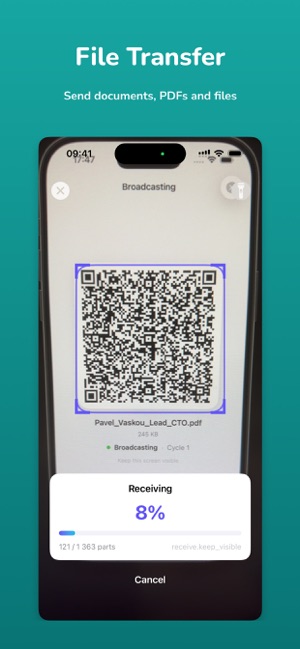

 QR File Transfer - PixyMoveIryna VaskovaTransfer content from one device to another with QR Transfer - PixyMove. Send text, photos, documents, and audio using a simple visual transfer experience. Choo-


 Color Quest: Hidden Tile CodesIryna VaskovaColor Quest: Hidden Tile Codes is an exciting adventure in a world of logic and colors! Test your intuition and strategy as you decode color combinations and un-


 Cockadoo: Task Manager & To DoIryna VaskovaCockadoo - Shared Task Manager & Family Planner Stop forgetting. Start getting things done - together. Cockadoo is a simple and powerful way to organize your li-


 Wordpaw: Logic & Brain GameIryna VaskovaWordPaw – A Story Puzzle Adventure Where Every Word Is a Clue! Step into the paws of a clever cat detective on a journey through mysterious letter puzzles. Word-