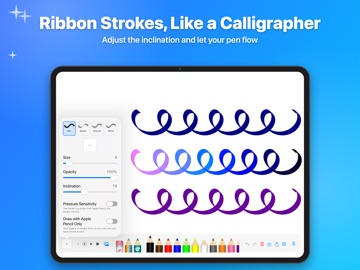
Draw on iPad lets you create beautiful drawings with a simple interface and plenty of tools, using your finger or Apple Pencil. No more paper lying around, dried-out markers or stains on your clothes: with Draw on iPad, drawing has never been so easy and so clean. The only limit is your imagination. THE MAGIC CRAYON Its color changes as you draw: every line becomes a rainbow. THE RIBBON EFFECT Adjust the inclination and your lines turn into ribbons, like with a calligraphy pen. ALL THE TOOLS YOU NEED • 15 colored crayons, plus any color you like with the color picker (your recent colors stay close at hand) • Pen, marker, airbrush and pencil • Adjustable size and opacity, with quick sizes in one tap • An eraser that never erases the background • Straight lines: hold your finger still for a moment at the end of a line • Unlimited undo and redo • Zoom up to ×5 for the details APPLE PENCIL • Lines get thicker the harder you press • “Draw with Apple Pencil Only” option, so you can rest your hand on the screen • Double-tap (or squeeze on Apple Pencil Pro) to switch to the eraser, depending on your settings DRAW ON YOUR PHOTOS Choose a white or black background, or a photo from your library to decorate or annotate. YOUR GALLERY Your drawings are saved automatically. Pick them up again whenever you like, duplicate them or delete them. SAVE AND SHARE Save your masterpieces to Photos to print them whenever you want, with or without the background (transparent image), and share them via Messages, Mail, AirDrop and your other apps. A MAGIC SLATE Draw on iPad also works as a slate to learn to write, practice math or play tic-tac-toe or hangman… For all ages, in portrait or landscape, with Dark Mode and VoiceOver.
Photo & Video · iPhone, iPad · Free
Rating: 3.3 out of 5, based on 3 user ratings.