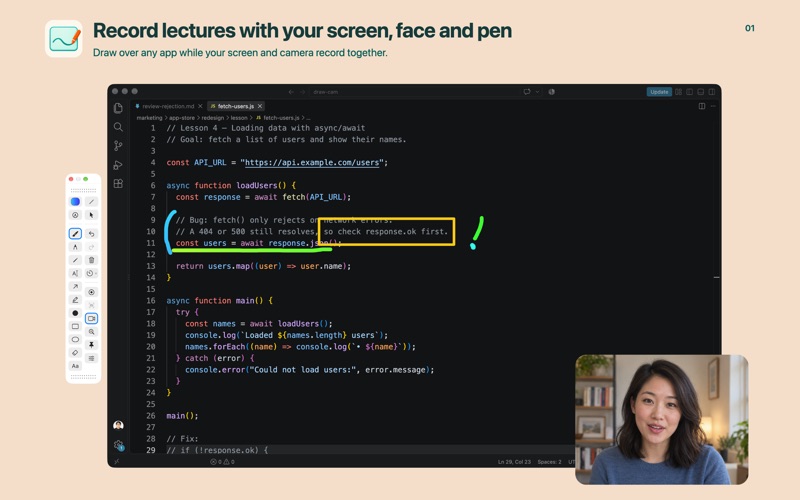
Make your explanation visible. DrawCam brings drawing tools, a presenter camera and screen recording together on your Mac. Explain a webpage, walk through a lesson or point out a detail without rebuilding your content as slides. CAPTURE THE EXPLANATION Choose your camera and microphone, start after a countdown, and save videos or screenshots. Preview the result when you finish. DrawCam’s toolbar appears in captures by default. To leave it out of DrawCam’s own videos and screenshots, turn on “Hide DrawCam windows from captures” in Settings. PRESENT YOUR WAY Move and resize your camera overlay. Adjust its border and shadow, choose a film look, or fine-tune face adjustments. Prefer to keep your camera image private? Replace the entire camera view with a 3D avatar. DRAW ON YOUR SCREEN Use brushes, pens, a textured pencil, markers, arrows, shapes and typed text. Save favorite colors, try strokes with gently shifting hues, and let temporary annotations fade away. Undo and redo keep your explanation moving. KEEP ATTENTION WHERE IT MATTERS Highlight cursor clicks, spotlight a detail or magnify part of your screen. Arrange your favorite tools in a compact floating toolbar, horizontally or vertically. MAKE ROOM FOR IDEAS Switch to a whiteboard without losing your screen annotations. Select, move and delete items, with separate undo histories for the screen and board. MADE FOR MAC DrawCam lives in the menu bar and supports keyboard shortcuts. The interface is available in English, Korean, Spanish, Japanese, Simplified Chinese, Traditional Chinese, German, French and Brazilian Portuguese. Requires macOS 14 or later. Capture and magnification require Screen Recording permission. Camera and microphone access are needed only when those inputs are used. Handwriting recognition languages are configured separately from the app language.
Productivity · iPhone, iPad · Free