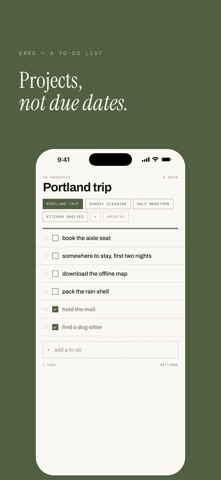
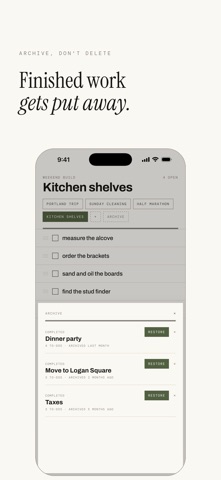
Erre is a to-do list built around projects instead of dates. Most task apps ask when something is due. Erre asks what it belongs to. Your to-dos live inside a project; that could be a shoot you are editing, a room you are cleaning, a trip you are getting ready for. Everything is accessible on one screen and extremely easy to navigate. WHAT IT DOES • Create, rename, reorder, and archive projects easily. The one you are working on fills the screen. • Drag to reorder. Swipe to delete. Tap to tick. • Completed to-dos sink to the bottom, struck through, and can be hidden entirely. • The line above each project name writes itself; "new", then "in progress", then "completed" as the work moves. Type your own label instead and Erre leaves it alone. • An archive for the projects you have finished, and a restore button for the ones you had not. • Four accent colors and two densities. ON IPAD AND IPHONE DUO On an iPad, or an iPhone Duo opened flat, Erre becomes a notebook laid open: a contents page of every project on the left, and the one you are working on facing it. On the closed Duo, the side column takes your accent color and holds the tools: add, projects, completed, and settings. Your list fills the rest of the screen. WHAT IT DOES NOT DO No account. No sign-in. No notifications, no streaks, no nagging, nothing to subscribe to. It also does not talk to the internet. There is no networking in the app at all — your projects and to-dos are written to a single file on your iPhone and they stay there. Nothing is collected, nothing is measured, nothing is sent anywhere. HOW IT LOOKS Erre is set in the manner of a printed field notebook: warm paper, a double rule under the header, monospaced small caps for the labels, and a serif where it counts. It is meant to look like something you would write in, not a dashboard.
Productivity · iPhone, iPad · Free
Rating: 5.0 out of 5, based on 1 user ratings.