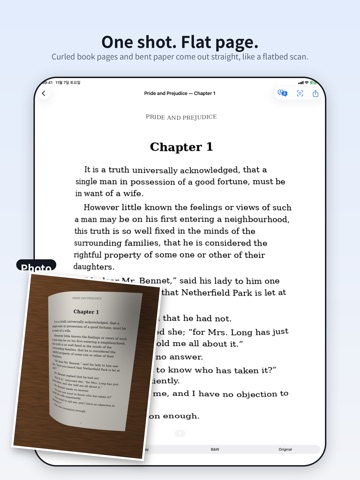
Point your camera at a book page, a receipt or any sheet of paper and tap once. ezScan finds the page, removes the background and straightens it — including curled book pages and bent receipts — so it comes out flat, like it was laid on a flatbed scanner. No corner dragging, no cropping. ONE SHOT, FLAT RESULT • Finds the paper automatically and cuts away the desk behind it • Flattens curled book pages using the lines of text themselves • Splits a two-page book spread into separate pages • Evens out shadows and uneven light; works on dark-mode screen photos too • Color, grayscale, black & white or original TEXT YOU CAN USE • Recognizes the text on each page, right on your device • For books: keeps only the body text — page numbers and running headers are removed, words broken across lines are joined, and footnotes move to the end • Copy, share or edit the text, and save the sentences you like to your collection TRANSLATE IN PLACE • Translate a page and see the translation drawn right where the original text was, at a similar size (iOS 18 or later) • Swipe between pages; the next pages are translated ahead of time KEEP AND SHARE • Scan many pages in a row and keep them as one document • Share as PDF or images, or save to Photos • Import photos you already took PRIVATE BY DESIGN Scanning, text recognition and translation run on your iPhone or iPad. Your pages are not uploaded to us. FREE, WITH OPTIONAL PRO Every scanning feature is free. The free version shows a small banner ad. ezScan Pro removes ads: monthly or yearly subscription, or a one-time lifetime purchase. New users get 7 days without ads. Subscriptions renew automatically unless cancelled at least 24 hours before the end of the current period. Manage or cancel in Settings > Apple ID > Subscriptions. Terms of Use (EULA): https://www.apple.com/legal/internet-services/itunes/dev/stdeula/ Privacy Policy: https://ezlong.com/app/ezscan/privacy.html
Productivity · iPhone, iPad · Free