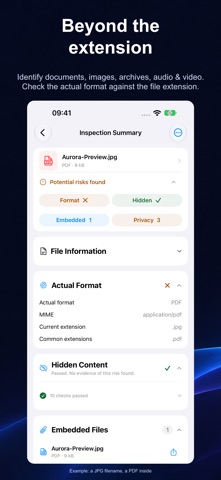
A file that looks like a JPG may actually be a PDF. A document you share may contain unintended embedded files. Research papers, proposals, bids and contracts can reveal sensitive information through tracked changes, author details and other document properties. File Deep Info for Mac, iPhone and iPad identifies actual file formats, reveals hidden content and embedded files, and helps you remove sensitive metadata. IDENTIFY ACTUAL FORMATS Identify file types from their contents and spot mismatched extensions. Inspect documents, images, archives, audio, video, databases and binary files. View file properties, hashes and hexadecimal file headers. DISCOVER HIDDEN CONTENT Check Word documents for hidden text, comments and tracked changes; Excel files for hidden sheets, rows and columns; PowerPoint files for hidden slides and speaker notes; and PDFs for hidden text, layers and attachments. EXPLORE EMBEDDED FILES Browse embedded files in a tree, preview supported content, and extract, batch-export or inspect files further. REMOVE METADATA. KEEP THE ORIGINAL. Review authors, editing information, photo EXIF and GPS metadata. Select fields to remove and create a cleaned copy while preserving the original file. CREATE FILE INSPECTION REPORTS Preview a full or summary report covering file information and inspection results. Export as PDF for reference or sharing. Choose Simplified Chinese, Traditional Chinese, English, Japanese, German or French, with a consistent layout across devices. PROCESSED LOCALLY. NO UPLOAD REQUIRED. File analysis, metadata cleanup and report generation run locally on your device. File inspection, metadata viewing and supported previews, including report previews, are free. A one-time Pro purchase unlocks saving cleaned copies, embedded file export, batch export, and saving and sharing PDF reports. Help and feedback: https://filedeep.info Terms of Use: https://www.apple.com/legal/internet-services/itunes/dev/stdeula/
Utilities · iPhone, iPad · Free