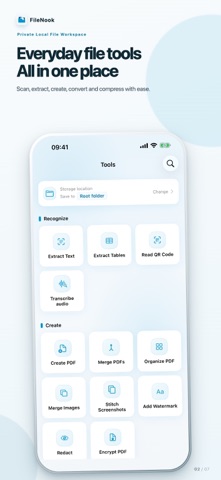
FileNook is a private local file workspace for iPhone and iPad. Organize files, read documents and prepare materials without a cloud-drive account. Files and document processing stay on your device unless you choose to share them. FILE WORKSPACE • Create folders; browse, rename, move, duplicate, sort and search files. • Use favorites, recent files and a recoverable trash. • Import from Files, Photos, AirDrop and the share sheet. • Transfer files from a computer over local Wi-Fi—no account or upload to a cloud service. • Search supported document content and inspect detailed file information. SCAN & RECOGNIZE • Scan ID cards with optional purpose watermarks and image enhancement. • Extract editable text from photos and PDFs. • Extract tables with cell review and export to Excel. • Recognize QR codes without automatically opening links. • Transcribe local audio with selectable ranges and TXT or SRT export. PDF TOOLS • Create searchable or standard PDFs from photos and document scans. • Merge PDFs; organize, reorder, rotate, insert, remove and extract pages. • Split PDFs by page, fixed groups or custom groups. • Crop page margins, compress PDFs and password-protect PDF copies. • Convert PDFs to images or editable Word documents. • Export TXT and Markdown to PDF; add optional covers, contents and page numbers. • Combine photos, scans and selected PDF pages; set a consistent A4 or Letter page size. PHOTO & PRIVACY TOOLS • Convert image formats, crop or resize to exact dimensions, and save reusable material presets. • Compress photos, combine images and stitch long screenshots. • Add text watermarks to images or PDFs. • Permanently redact selected areas of images and PDFs before sharing. VIDEO & AUDIO TOOLS • Compress compatible videos and preview the result before saving. • Extract an audio track or selected time range from a video. READ & PLAY • Read PDF, EPUB, DRM-free MOBI, TXT and Markdown files. • Play local video and audio, including supported HDR video, subtitles, picture in picture and seek-preview thumbnails. LOCAL PROTECTION • Protect app access with an independent passcode and optional biometrics. • Create password-encrypted backups and password-protected ZIP archives. • App Lock protects access to the app; it cannot protect copies after you export or share them. Basic file operations, reading, audio and videos up to 30 minutes are free. Selected recognition, conversion and batch tools share 3 trial uses in total, with no daily refill. Each optional tool reward ad adds 2 uses, up to 2 ads per day. Videos longer than 30 minutes: unlock 3 different videos free each day, then watch an optional reward ad for 1 additional unlock. Reopening the same unchanged video that day does not use another unlock. Tool and video rewards are separate and unspent rewards do not expire. Pro is a one-time purchase that removes all ads and tool/video usage limits. File-size, page-count and batch safety limits still apply. No new monthly or annual subscription is offered. Privacy Policy: https://apps.vanto.space/en/app/folder/privacy/ Terms of Use: https://apps.vanto.space/en/app/folder/terms/
Utilities · iPhone, iPad · Free
Rating: 4.7 out of 5, based on 7 user ratings.