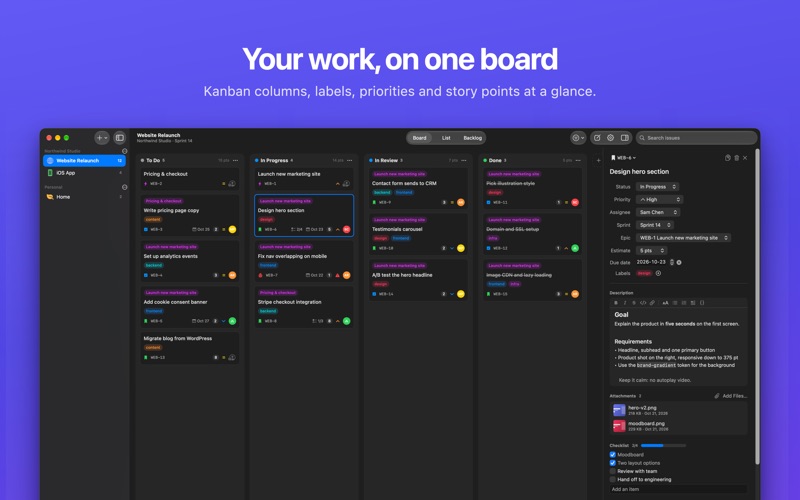
Flowboard is a native Mac app for planning work on Kanban boards and running sprints. It's as simple as a wall of sticky notes, with the structure you need when a project gets serious: sprints, epics, story points and a real backlog. PLAN ON A BOARD • Organize work into organizations and projects, each with its own workflow columns • Drag cards between columns, and give columns colors, icons and work-in-progress limits • Switch between Board, List and Backlog views with ⌘1, ⌘2 and ⌘3 • Assign issues, set priorities, labels, due dates and estimates RUN SPRINTS • Plan a sprint with a goal and dates, then start and complete it from the Backlog • Unfinished work moves back to the backlog when a sprint ends • Group related issues into epics and size them with story points WRITE IT UP YOUR WAY • Rich text or Markdown descriptions, your choice. Switch anytime without losing formatting • Headings, lists, quotes, code blocks and links • Checklists, comments and an activity history on every issue ATTACH ANYTHING • Drop files onto an issue, or paste a screenshot straight into its description • Preview attachments with Quick Look, open them or save a copy BUILT FOR THE MAC • Every action is in the menu bar, and most have a keyboard shortcut. Press ⌘/ to see them all • Search and filter by assignee, label, priority, type or sprint • Light and dark mode, system colors and VoiceOver support • Undo and redo for your changes SYNCED WITH ICLOUD • Your boards sync across your Macs through your private iCloud database • No account to create. Flowboard has no servers of its own and no tracking • Works offline, and syncs when you're back online FREE AND PRO Flowboard is free for 1 organization and up to 3 projects, with every board, list and backlog feature. Flowboard Pro is a one-time purchase that unlocks unlimited organizations and projects, sprints, epics and attachments. No subscription. Family Sharing is supported.
Productivity · iPhone, iPad · Free