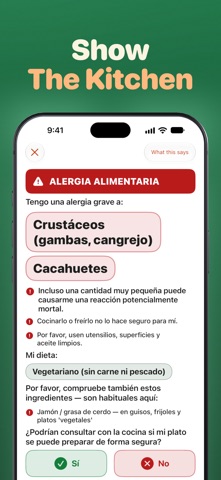
Read menus and signs, talk with people, and show the kitchen your food allergy, in the local language. Most of it works offline. START IN 3 STEPS 1. On the Trip tab, pick where you're going (45 countries). 2. Under Get ready, tap the button to download the language. 3. In Translate, pick Type, Talk, Listen, Menu or Camera. Not translated yet: Greek, Czech, Hungarian and Filipino. Some others, like Hebrew and Malay, need iOS 27. CAN'T READ THE MENU? • Menu: tap Snap and photograph each page. Dishes show in your language, with sections and prices. • Tap a dish for an AI briefing: what it is and what's usually in it. • Camera: point at a sign and the translation appears on the words. • Menu and Camera can't read Hebrew yet, or Hindi before iOS 27. NEED TO TALK? • Type: write what you want to say. "Reads back as" translates it back so you can check it. • Show them: big text they can answer with Yes, No or a typed reply, translated back. • Talk: a mic for each of you. Speak, and hear the translation out loud. With Hands-free on, the mics take turns. • Listen: live captions for announcements. Add your stop or hotel as locals write it, keep Listen open, and the caption is highlighted when it's said. • Talk, Listen and practice work in English, Spanish, French, German, Italian, Portuguese, Japanese, Korean and Chinese (plus Hindi on iOS 27). Others: use Type, Menu or Camera. GOT A FOOD ALLERGY? • On the Phrases tab, make your card: your allergies (14 allergens), how serious it is, and your diet, like vegan, halal or kosher. • Show it full screen in the kitchen's language (16 languages). It warns about hidden allergens in 8 cuisines, like fish sauce in Thai food. • Staff tap Yes or No to answer. "What this says" shows you the card in English. • Share it as a PDF to print. • Translated cards are drafted by AI and say so. Always confirm out loud. NEED HELP FAST? • Emergency cards: 13 big, ready-to-show phrases, like "Please call an ambulance." Always free. • Ask Siri: "Flunqero emergency" or "Show my allergy card in Flunqero". NEW COUNTRY, NEW RULES? • How much is that? Type a price, see it in your money, offline with saved rates. • Know before you go (Pro): tipping, a tip helper, etiquette notes, and haggling tips in some countries. • Ask anything (Pro): taxis, plugs, tap water and more, answered on your device. It's built to refuse medicine doses. SAVE WHAT WORKED • Ready-made travel phrases, from greetings to money. • Save phrases into folders, and find past translations in Recents. • Practice saying phrases: each word is marked to show what to fix. • iCloud syncs your phrases between iPhone and iPad. ON YOUR APPLE WATCH • Your allergy card and newest saved phrases, plus spoken phrases for your trip in 14 languages. Works without your iPhone once synced. • Add the Travel Phrase complication to a watch face. NO SIGNAL? With the language downloaded, Type, Menu, Camera, phrases, and emergency and allergy cards work offline. Talk, Listen and practice download speech the first time, so use them once online. FREE AND PRO Everything is free except Ask anything and Know before you go. Free limits: 30 saved phrases, 3 AI dish briefings a day, and your allergy card in one language (your trip's is always free). Pro removes these limits. US prices: $24.99 a year after a 7-day free trial (auto-renews), or $39.99 once for Lifetime. No trial left? A 30-day Trip Pass ($3.99, no renewal) is offered too. NEEDS APPLE INTELLIGENCE Ask anything, etiquette notes, AI dish briefings, reply suggestions in Hands-free Talk, and tone rewriting. Turn it on in Settings (iPhone 15 Pro or newer, or a supported iPad). Everything else works without it. PRIVATE BY DESIGN Translation, speech and AI answers run on your device. No account. No ads. No tracking. Privacy Policy: https://fierce-inlet-63133.herokuapp.com/flunqero-privacy Terms of Use (EULA): https://www.apple.com/legal/internet-services/itunes/dev/stdeula/
Travel · iPhone, iPad · Free