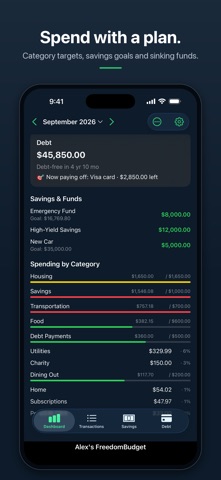
Decide where your money is going before it goes. FreedomBudget lays out every paycheck and bill for the month, keeps a running balance after each one, and shows you where you'll land at month-end. Financial Freedom is within reach… Take the first step with FreedomBudget. SEE YOUR WHOLE MONTH • Your current balance, your lowest point this month, your month-end balance, and what's left over • A running balance after every transaction, so you can see a tight week coming • A 30-day cash-flow chart • Mark transactions cleared as they hit your bank, and reconcile against your bank balance in a few taps • A warning before a change would take your balance below zero OPTIONAL BANK SYNC See what your bank has posted, clear the matching bills, and add anything you missed. Review each match yourself or choose which ones clear automatically. Bank sync runs through SimpleFIN Bridge, a separate third-party service with its own subscription. You link your bank on SimpleFIN's website, never in this app, so we never see your bank login. Banks report posted transactions, often a day or more after they happen. SET BILLS ONCE Add a bill or paycheck once and it repeats: monthly, on the last day, weekly, every two weeks, quarterly, twice a year or yearly. Give it an end date or a number of payments and it stops on its own. Mark autopay bills and they clear themselves. Flag bills whose amount varies and you're asked to confirm the real amount. SPEND WITH A PLAN • Monthly targets for the categories you choose, with progress bars on the dashboard • Savings accounts and sinking funds, with goals, target dates and a monthly contribution • Transfers between checking and savings, one-off or recurring • An estimate of each month's savings interest to confirm against your statement PAY OFF DEBT FASTER Add your loans and cards and choose snowball or avalanche. FreedomBudget schedules the payments, shows your debt-free date, and estimates the interest you'll save compared with paying minimums. YOUR WHOLE YEAR AT A GLANCE A year-to-date summary plus reports: income vs. spending, month over month, variable expenses, and unplanned spending. BUDGET TOGETHER Invite a partner at no extra charge. Choose full access, where you both add and edit, or contribute-only, where your partner suggests transactions and you approve them. YOUR BUDGET. YOUR DATA. YOUR GOOGLE DRIVE. Your budget is a Google Sheet in your own Google Drive. Not our servers. We never see it, and we have no way to read it. You don't have to link a bank to use FreedomBudget, and we never see a bank password. Open your budget in Google Sheets on any device, share it with an accountant, or keep it after you stop using the app. It stays yours whether or not you subscribe. A Google account is required. Lock the app with Face ID, Touch ID or your passcode. TRY IT FIRST Tap Explore with Sample Data to try the whole app on a sample budget before signing in. Nothing you do in the demo is saved. NO ADS, NO TRACKING, NO SELLING YOUR DATA There is no advertising in this app and no advertising software in it. We do not sell or share your information. Crash and usage reporting can be switched off in Settings, and never includes your amounts, balances or descriptions. FreedomBudget is free for 30 days. After that it's $4.99 per month or $49.99 per year, and a partner you invite never pays. Payment is charged to your Apple ID at confirmation of purchase. It renews automatically unless cancelled at least 24 hours before the period ends, and you can manage or cancel it in your Apple ID settings. Terms of Use: https://freedomfinancialapps.com/freedombudget/terms Privacy Policy: https://freedomfinancialapps.com/freedombudget/privacy FreedomBudget is a budgeting tool. Balances are based on what you enter and, if you use optional bank sync, the bank transactions you accept or choose to clear automatically. We don't verify them against your bank, and nothing in the app is financial advice.
Finance · iPhone, iPad, Android · Free