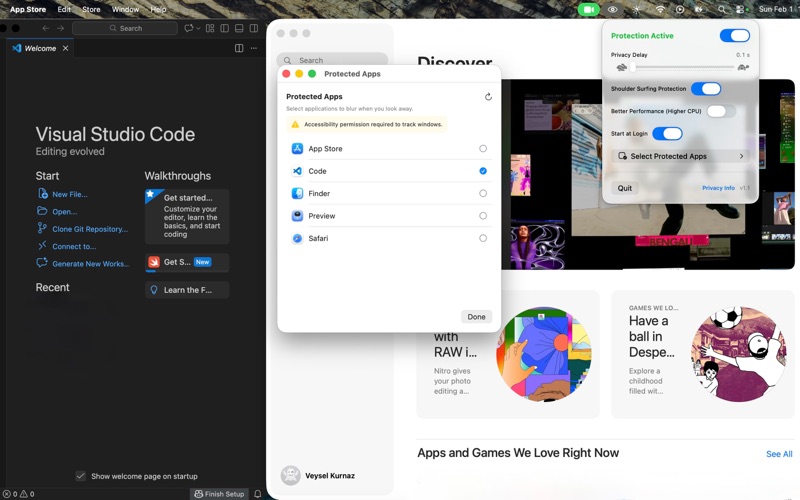
Your screen is private. Gaze Guard keeps it that way. Gaze Guard watches for two things: when you look away from your Mac, and when someone else looks at it. Either one blurs your screen instantly. Look back, and it clears just as fast. WHERE IT EARNS ITS KEEP • Open offices — your salary spreadsheet is not a team document • Cafés and coworking spaces — the person behind you has a great view • Trains and planes — the seat next to you is very close • Anywhere you handle something you would not read aloud HOW IT WORKS Gaze Guard uses your Mac's camera and Apple's on-device Vision framework to detect faces and gaze direction. It sits in your menu bar, stays out of your way, and uses the camera only while protection is on. YOUR VIDEO NEVER LEAVES YOUR MAC Not a single frame is recorded, uploaded, or sent anywhere. No account, no server, no tracking, no analytics. The only thing the app ever connects to is the App Store, to verify your purchase. BUILT FOR MAC • Adjustable blur delay — from instant to relaxed • Protect every app, or only the ones you choose • Two modes: anyone nearby, or only direct eye contact • Shortcuts support for starting and stopping protection • Optional low-power mode for long battery days TRY IT, THEN OWN IT Everything is unlocked free for 3 days. After that, one purchase unlocks Gaze Guard for life. No subscription, no renewals, no account. Note: Gaze Guard needs camera access to detect faces and gaze direction. No images are ever stored or transmitted. Terms of Use: https://www.apple.com/legal/internet-services/itunes/dev/stdeula/
Utilities · iPhone, iPad · Free