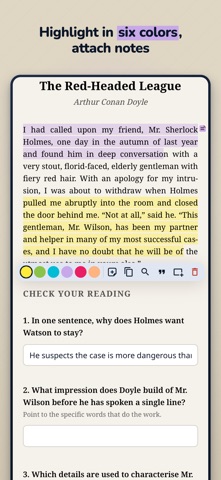
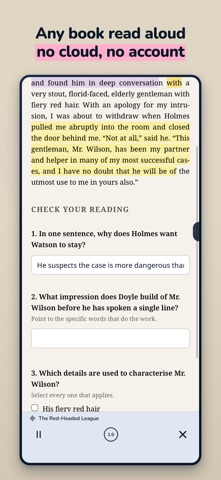
GemReader is an offline EPUB and PDF reader that saves everything you do inside a book — your form answers, highlights, notes, and flashcards. Built for people who read to learn, not just to finish. No account. No tracking. Your library is encrypted on your device, and backups are optional. YOUR FORM ANSWERS ARE SAVED Most ebook readers throw away what you type. GemReader doesn't. Fill in a workbook exercise, close the book, come back a week later — your answers are exactly where you left them. Every text field, checkbox, dropdown, and radio button in an interactive EPUB is saved automatically. HIGHLIGHT AND ANNOTATE Highlight passages in six colors and attach a note to any highlight. Add standalone text notes, bookmarks, and notes pinned to images. Notes support Markdown. Tag anything you keep, name the highlight colors yourself, and see every highlight and note from your whole library in one searchable list. Keep PIN-locked notebooks, and store videos, diagrams and photos encrypted beside your books. STUDY TOOLS BUILT IN Look up any word in the in-book dictionary without leaving the page. Turn your highlights into flashcards and drill them with the built-in spaced repetition review deck. Export annotations to Anki, or import your existing .apkg and .txt decks straight into the app. FREE BOOKS TO START WITH Browse Project Gutenberg, Standard Ebooks and other open catalogs from inside the app and download straight into your library. Add any OPDS catalog you trust. Downloads are encrypted on arrival, like every other book. LISTEN TO YOUR BOOKS A neural text-to-speech voice reads any book aloud, generated entirely on your device — no cloud, no account, and no connection needed once the voice is installed. Books that ship with their own chapter audio play that instead, with lock-screen playback controls. PDF READER INCLUDED Open PDFs alongside your EPUBs. Fixed-layout rendering, working links and form fields, pinch-to-zoom, full-text search, and dark mode. ENCRYPTED LIBRARY Your books are encrypted at rest with AES-256-GCM. No plaintext file ever touches disk. Lock individual collections behind their own key, and lock the whole app with Face ID or a PIN when you put it down. Your books stay yours. BUILT FOR OFFLINE READING Everything works with the network off. No account is required, and nothing is uploaded unless you turn on encrypted backup to your own Google Drive. ORGANIZE A REAL LIBRARY Grid and list views, nested collections with custom colors, cover art, full-text search across your library, table of contents, footnotes, image zoom, and reading history so you can jump back to where you were three chapters ago. MADE COMFORTABLE TO READ Light, dark, sepia, and high-contrast Ultra themes. Adjustable fonts, margins, and layout. Immersive full-screen reading. Tablet support on iPad. Interface available in 18 languages: English, Spanish, Portuguese, Hindi, Indonesian, French, German, Russian, Arabic, Chinese, Japanese, Korean, Burmese, Khmer, Amharic, Turkish, Vietnamese, and Thai. SHARE WITHOUT THE CLOUD Gem Beam hands a book, or a whole collection, to the phone next to you directly, device to device — no internet, no account, nothing leaving the room. Highlights, notes, reading position and study progress travel with them. You can also export a book as an encrypted .gem pack, optionally as a scannable QR code, or turn a favorite passage into a shareable quote card image. WHO IT'S FOR • Students working through interactive textbooks, workbooks, and study guides • Language learners who need a dictionary, flashcards, and audio in one place • Researchers and professionals who annotate heavily and need it to stay put • Anyone who wants a private, offline ebook reader with no account attached GemReader reads DRM-free EPUB, PDF, MOBI, AZW3, FB2, CBZ and TXT files. Import from your device, share into the app, or download from the catalogs above. Note: iOS doesn't let apps block screenshots or screen recording.
Book · iPhone, iPad · Free
Rating: 5.0 out of 5, based on 1 user ratings.