
Screenshots


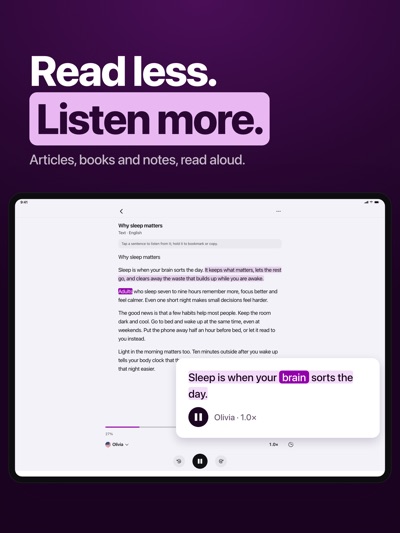

About Gen Voice: Listen to Anything
Listen to anything you would otherwise read. Gen Voice reads documents, books, web articles and even printed pages aloud in a natural voice, so you can keep going on your commute, while you cook, or when your eyes need a rest.
OPEN AND LISTEN
• Files: PDF, EPUB, Word and TXT, including files in iCloud Drive
• Web pages: paste a link or share straight from Safari
• Photos: snap a printed page and listen right away
• Paste: any text you have copied
• Audio files: play your MP3, M4A and WAV files and pick up where you left off
MADE FOR LISTENING
• Words highlight as they are read, and the page follows along
• Tap a sentence to listen from there, hold it to bookmark or copy
• Speed from 0.8× to 2×, with 15-second skips
• Contents, search and bookmarks for long documents
• Sleep timer for listening in bed
• Every document remembers where you stopped
• Plays on to the next document in your library
NATURAL VOICES
• Online voices in many languages, ready instantly
• Offline voices for Vietnamese, English, Japanese, Chinese, Spanish and French: download once, listen without internet
• Preview voices and keep your favorites
ALWAYS WITHIN REACH
• Keeps playing with the screen locked or in other apps
• Controls on the Lock Screen and in Control Center
• Continue Listening widget for the Home Screen and Lock Screen
STUDIO
Type or paste text, choose a voice and speed, and create an audio file to save to Files or share.
PRIVACY
No account needed. Your library, audio and recognized text stay on your iPhone. Offline voices run entirely on your iPhone; online voices send the text being read to our server to create speech.
AVALW Coverage
Not yet mentioned in AVALW articles.
Similar apps


 MyJio: For Everything JioJio Platforms LimitedTrue 5G, recharges, payments & UPI, music & movies, backup, games, news & more.★ 4.4 27428k


 Microsoft WordMicrosoft CorporationThis application requires a qualifying Microsoft 365 subscription. Microsoft 365 includes premium Word, Excel, and PowerPoint apps, 1 TB cloud storage in OneDri★ 4.8 17535k



 Samsung NotesSamsung Electronics Co, Ltd.(Samsung Notes is optimized for Samsung Galaxy Books. Other computers may have issues running it.) "Samsung Notes allows you to use the enhanced S Pen to write ★ 4.8 15228k



 ChatGPT ClassicOpenAIThe official ChatGPT desktop app brings you the newest model improvements from OpenAI. Do more on your PC with ChatGPT: · Instant answers—Use the [Alt + Space] ★ 4.8 11034k


 ChatGPTOpenAI OpCo, LLCIntroducing ChatGPT for iOS: OpenAI’s latest advancements at your fingertips. This official app is free, syncs your history across devices, and brings you the l★ 4.8 11034k


 Microsoft OutlookMicrosoft CorporationOutlook helps you stay connected and organized at the office and at home with easy access to emails, files, calendar events, and contacts across all your accoun★ 4.3 10673k


 Turbo VPN: Unlimited VPN ProxyINNOVATIVE CONNECTING PTE.LIMITEDDo you want online security and privacy while browsing? Turbo VPN now provides the fastest, reliable and encrypted network. With Turbo VPN, you can get the safe★ 4.7 10243k



 Microsoft ExcelMicrosoft CorporationThis application requires a qualifying Microsoft 365 subscription. Microsoft 365 includes premium Word, Excel, and PowerPoint apps, 1 TB cloud storage in OneDri★ 4.8 9702k
More by this developer


 Mojo Draw: Color & RelaxDIGITAL MATE JOINT STOCK COMPANYMojo Draw is a modern coloring book app that combines relaxing coloring, satisfying ASMR sounds, and creative AI tools. Enjoy a calming coloring experience with★ 5.0 1


 MOJO ExpressDIGITAL MATE JOINT STOCK COMPANYMojo Express – Your personal AI art studio Turn your ideas into unique AI-generated images with Mojo Express. Simply describe what you want to create, choose an★ 2.3 3


 MOJO AIDIGITAL MATE JOINT STOCK COMPANYExperience the magic of turning your ideas into mesmerizing digital masterpieces effortlessly! Just input your creative prompt, select an artistic style, and le★ 4.0 9


 MOJO CUTDIGITAL MATE JOINT STOCK COMPANYRemove backgrounds with AI and create stunning photo edits in seconds. Full Description Mojo Cut is an AI-powered photo editor that helps you remove backgrounds★ 3.8 12