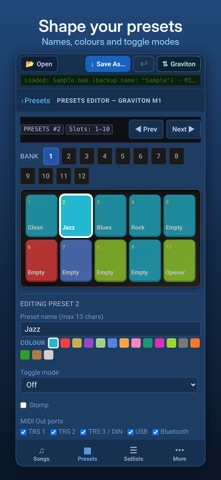
Graviton Editor edits backup files (.bak) from the Luminite Graviton M1 and M2 MIDI foot controllers. Plan your songs, presets and setlists on a phone or tablet, away from the unit's own screen. WHAT YOU CAN EDIT • Songs: names, the ten preset slots, the startup preset and song BPM • Presets: names, colours, toggle mode, MIDI Out ports and their MIDI messages • Setlists • MIDI In: the PC and CC triggers that jump to songs or fire presets, with a clash checker • SysEx messages, MIDI channel names and CC/PC labels • Hardware settings: F6W footswitch, expression pedals, jacks and Universal footswitch • Copy songs from another backup, and keep a library of songs to reuse LOAD AND SEND OVER WI-FI Load a backup straight from your Graviton, or send an edited one back, over your own Wi-Fi network. Choose the backup slot on the Graviton, press Export or Import, and the app does the rest. Sending overwrites the chosen slot, so keep a second copy of your setup in another slot. YOUR BACKUP, KEPT INTACT • Only the settings you change are changed. Everything else in the backup is saved exactly as it was. • Undo as you go, and save under a new name whenever you like. • Open and save backups through the Files app. • No account, no tracking and no data collected. Works offline. • Try the built-in sample backup without a Graviton. Graviton Editor is an independent app and is not made by Luminite. Always keep a copy of your original backup before editing.
Music · iPhone, iPad, Android · Free