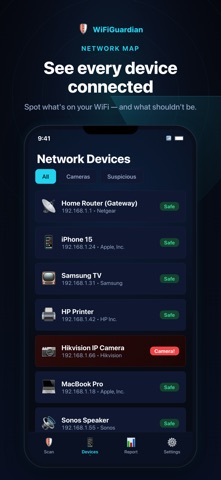
Hidden Cam Detector scans the WiFi network you are connected to and flags devices that look like IP cameras. Use it in a hotel room, a rental or a shared office before you settle in. HOW IT WORKS - Connect to the WiFi and tap Scan. - Every device on the network is discovered and listed. - Devices that match known camera manufacturers or camera ports are flagged in red. - Open a flagged device to see its manufacturer, IP address, open ports and a confidence score. - Get a security score and a threat report for the whole network. WHAT IT CAN AND CANNOT DETECT The scan finds cameras that are connected to the same WiFi network as your phone. Analog cameras, wired cameras and cameras that are switched off or on a different network cannot be detected. No app can guarantee that a room is camera-free. PRIVACY All scanning runs on your device. Device lists, IP addresses and scan results never leave your phone. No account, no tracking, no ads. SUBSCRIPTION Hidden Cam Detector requires a subscription. Choose a monthly or an annual plan; the price for your country is shown in the app before you subscribe. Payment is charged to your Apple ID account at confirmation of purchase. The subscription renews automatically unless auto-renew is turned off at least 24 hours before the end of the current period. Your account is charged for renewal within 24 hours before the end of the current period. You can manage or cancel your subscription in your Apple ID account settings after purchase. Terms of Use (EULA): https://www.apple.com/legal/internet-services/itunes/dev/stdeula/ Privacy Policy: https://legal-site-delta.vercel.app/privacy
Utilities · iPhone, iPad · Free