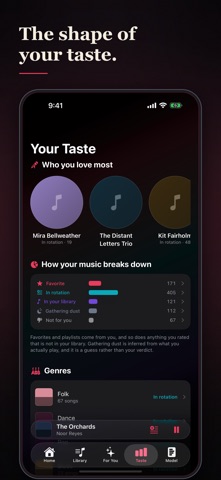
How to Music reads your Apple Music library and works out what you actually like, from what you already do. What you favorite. What you put in playlists. What you play, and what you skip. It never asks you to rate anything. Then it shows you the part nothing else does: the records you already own and have forgotten. BEFORE YOU DOWNLOAD Everything in this app is built from your own Apple Music library, so it has nothing to show on an empty one. Playing full songs needs an active Apple Music subscription; without one you still get every screen, and the play button falls back to 30-second previews where they are offered. There is a sample library in Settings if you want to look around first. WHAT IT DOES Your library, in tiers Every song sorted by how strongly the evidence says you love it. Not a guess about what you might like next. A read on what you already have. Picked for You Songs from your own collection you have overlooked, barely played, or not played in years. Your taste profile The artists, the patterns and the shape your collection adds up to, and what that says about the person who built it. The model, and how well it reads you Most apps ask you to trust the recommendation. This one shows you how accurate it has been, on your library, and tells you when it does not have enough to go on yet. HONEST ABOUT WRITES The star and the thumbs-down write a rating to your Apple Music account, exactly as Love and Suggest Less Like This do inside Apple Music itself. Adding a song to a playlist writes to your playlist, and the app says so before it does it. The Like button is internal to this app and is never sent to Apple Music. WHAT IT READS Your play counts and the dates you last played things, which Apple Music already records for you. That is how the app knows what you have been listening to, wherever you listened to it. It is read on this device and kept on this device, and none of it is sent anywhere. Free. No ads, no accounts, no tracking, no analytics. Your likes sync through your own private iCloud; your library is not copied anywhere, because Apple Music already syncs it.
Music · iPhone, iPad · Free
Rating: 5.0 out of 5, based on 1 user ratings.