
Screenshots



About InfiniteX2P Pro — Desktop Mode
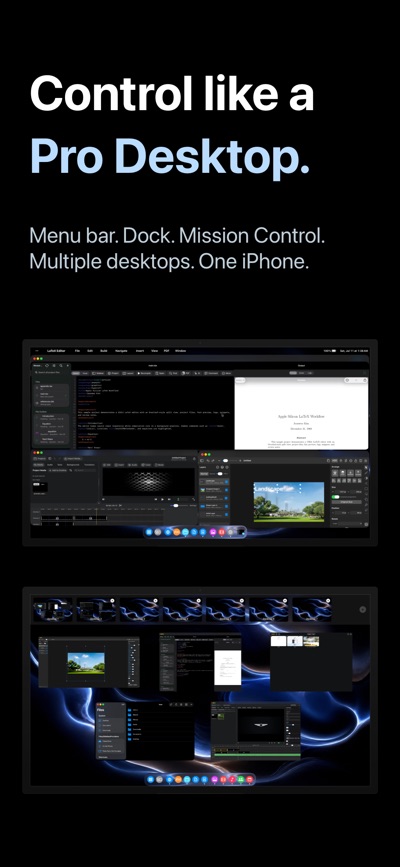
InfiniteX2P Pro transforms iPhone into a Pro Desktop and gives iPad a powerful desktop-style creative workspace.
Built for both iPhone and iPad, InfiniteX2P Pro brings movable windows, pro creation tools, Files integration, iCloud Calendar, Contacts, Apple Music, a rebuilt Web Browser, rebuilt Web Apps, and external display support into one unified environment.
Use it directly on iPhone with external display as a pocket Pro Desktop Computer. Connect an external display when you want more room for editing, browsing, writing, files, and multitasking.
PRO TOOLS BUILT IN
Video Editor:
• Create video projects
• Import media
• Arrange clips on a timeline
• Work with video and audio tracks
• Preview edits
• Adjust audio and color settings
• Configure export options
• Export completed videos
Image Editor:
• Create image projects with layers
• Add text, shapes, fills, brush strokes, and effects
• Crop, arrange, rotate, resize, and flip content
• Adjust opacity and blend modes
• Export as PNG, JPEG, or HEIC
LaTeX Editor:
• Create and manage LaTeX projects
• Edit source files and compile locally with bundled LaTeX/Tectonic support
• Preview generated PDFs and view compile logs
• Use templates, snippets, symbols, tables, images, citations, and bibliography tools
• Run package, document class, accessibility, arXiv, and review checks
• Export ZIP projects and app archives
IPHONE & IPAD INTEGRATION
InfiniteX2P Pro works with the tools and data already on your device.
• Files integration for browsing, organizing, importing, and exporting documents
• iCloud Calendar access for viewing, creating, and editing events
• Contacts access for browsing your address book
• Apple Music access inside the workspace
• Photo and media import workflows for creative projects
• Local document, download, and project storage
DESKTOP-STYLE WORKSPACE
InfiniteX2P Pro gives iPhone and iPad a flexible window-based interface.
• Movable, resizable app windows
• Minimize and maximize controls
• Dock, Launchpad, Mission Control, and multiple Spaces
• Keyboard shortcut support
• Pointer and touch-friendly controls
• Workspace restoration and profiles
Keep your browser, files, calendar, contacts, music, notes, and creative editors open together instead of constantly switching between separate full-screen apps.
REBUILT WEB BROWSER
The Web Browser in InfiniteX2P Pro has been reworked from the ground up.
• Rebuilt browser architecture
• Improved SSO sign-in flow
• Tab view with page previews
• Tabbed browsing
• Bookmarks and downloads
• Address and search tools
• Mobile/desktop website switching
• Find and page tools
• Better workspace integration
REBUILT WEB APPS
Web Apps have also been reworked from the ground up, making websites feel more integrated inside the InfiniteX2P Pro workspace.
• Add websites as workspace apps
• Launch saved web apps from the desktop-style environment
• Keep web apps alongside files, editors, calendar, contacts, and other tools
• Use web apps as part of a larger multitasking workflow
FILES & DOCUMENT MANAGEMENT
Manage documents and project files from inside InfiniteX2P Pro.
• Browse Documents and Downloads
• Create files and folders
• Rename, move, copy, and delete items
• Add sidebar shortcuts
• Switch between list and icon views
• Use drag-and-drop where supported
• Preview files through Lookup
• Import and export project content
• Work with documents used by the Pro editors
EXTERNAL DISPLAY SUPPORT
Use InfiniteX2P Pro directly on iPhone or iPad, or connect to an external display for a larger desktop-style setup with mirroring support, external display resolution options, and more room for editing, browsing, writing, and file management.
Terms of Use (EULA): https://www.apple.com/legal/internet-services/itunes/dev/stdeula/
Privacy Policy: https://github.com/kjwamlex/InfiniteX2P-Pro-Privacy-Policy/blob/main/README.md
AVALW Coverage
Not yet mentioned in AVALW articles.
Similar apps


 MyJio: For Everything JioJio Platforms LimitedTrue 5G, recharges, payments & UPI, music & movies, backup, games, news & more.★ 4.4 27428k


 Microsoft WordMicrosoft CorporationThis application requires a qualifying Microsoft 365 subscription. Microsoft 365 includes premium Word, Excel, and PowerPoint apps, 1 TB cloud storage in OneDri★ 4.8 17535k



 Samsung NotesSamsung Electronics Co, Ltd.(Samsung Notes is optimized for Samsung Galaxy Books. Other computers may have issues running it.) "Samsung Notes allows you to use the enhanced S Pen to write ★ 4.8 15228k



 ChatGPT ClassicOpenAIThe official ChatGPT desktop app brings you the newest model improvements from OpenAI. Do more on your PC with ChatGPT: · Instant answers—Use the [Alt + Space] ★ 4.8 11034k


 ChatGPTOpenAI OpCo, LLCIntroducing ChatGPT for iOS: OpenAI’s latest advancements at your fingertips. This official app is free, syncs your history across devices, and brings you the l★ 4.8 11034k


 Microsoft OutlookMicrosoft CorporationOutlook helps you stay connected and organized at the office and at home with easy access to emails, files, calendar events, and contacts across all your accoun★ 4.3 10673k


 Turbo VPN: Unlimited VPN ProxyINNOVATIVE CONNECTING PTE.LIMITEDDo you want online security and privacy while browsing? Turbo VPN now provides the fastest, reliable and encrypted network. With Turbo VPN, you can get the safe★ 4.7 10243k



 Microsoft ExcelMicrosoft CorporationThis application requires a qualifying Microsoft 365 subscription. Microsoft 365 includes premium Word, Excel, and PowerPoint apps, 1 TB cloud storage in OneDri★ 4.8 9702k
More by this developer


 ClockAPX — Dynamic ClockJoonwoo KimClockAPX turns your iPhone into a customizable clock studio for TVs and external displays. Pick a clock face, tune the look, and mirror it in real time for desk-


 ConnectCX — Car InfotainmentJoonwoo KimConnectCX. REIMAGINE YOUR CAR ConnectCX turns your iPad into a SMART COCKPIT — a modern, software-defined driving experience designed to replace traditional inf-


 MusicAPX — Lyrics & ThemesJoonwoo KimMusicAPX turns your Apple Music session into a full-screen lyric and visual experience for external displays, while MusicCX keeps live lyrics on your Lock Scree★ 2.0 1