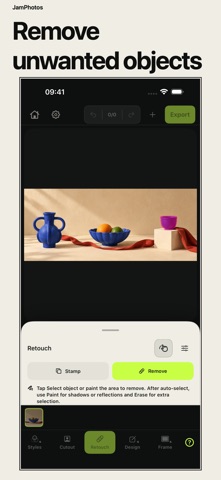
Return to an earlier edit when a project takes a different turn. JamPhotos keeps up to 10 previous versions of a saved project on this device. Restore one when you need it; the current state stays in project history. Remove unwanted objects with automatic selection or the Paint, Erase, and Protect brushes. Review one removal, select the next object, then Save when the photo is ready. WORK THROUGH A PHOTO SET • Apply adjustments across a batch • Match color and light from a reference photo • Crop, resize, rotate, and frame images • Add a watermark when the export needs one BUILD THE FINAL LAYOUT • Create collages and contact sheets • Make social carousels with precisely aligned page edges • Build before-and-after layouts and reusable export recipes • Export JPEG, HEIC, or PNG with controls for size, color profile, transparency, and metadata For product shoots, social posts, travel albums, and client photo selections. No account is required. Your selected photos and edits are processed on your device. JamPhotos does not upload your photo content to our server. One full-resolution photo export per day is free. Pro removes the daily export limit and supports up to 50 photos per batch. Eligible subscribers get a 3-day free trial. Prices and renewal terms are shown before purchase. Terms of Use: https://kamnevapps.com/jamphotos/en-US/terms/ Privacy Policy: https://kamnevapps.com/jamphotos/en-US/privacy/
Photo & Video · iPhone, iPad · Free