
Screenshots




About JPEG to PDF: JPG Converter
Convert JPEG Photos to PDF — Instantly!
JPEG to PDF is the fastest, easiest way to convert your JPEG photos into professional-quality PDF documents. Whether you need to digitize receipts, create photo albums, or share documents — JPEG to PDF has you covered.
WHY CHOOSE JPEG TO PDF?
• Lightning-fast conversion — Turn any JPEG into a PDF in seconds
• Batch processing — Convert multiple JPEG images into a single PDF at once
• Custom layouts — Choose page sizes, orientations, and margins
• Stunning quality — Preserve every detail of your original images
• Simple sharing — Export and share PDFs via email, messaging, or cloud storage
POWERFUL FEATURES
Convert from Any Source:
• Camera — Snap a photo and instantly create a PDF
• Photo Library — Select one or multiple JPEG images to convert
• Supports JPG, JPEG, and camera photos
Customize Your PDFs:
• Multiple page sizes — A4, Letter and Legal
• Portrait or landscape orientation
• Adjustable margins and image fitting options
Professional Output:
• High-resolution PDF output
• Merge multiple JPEG images into one document
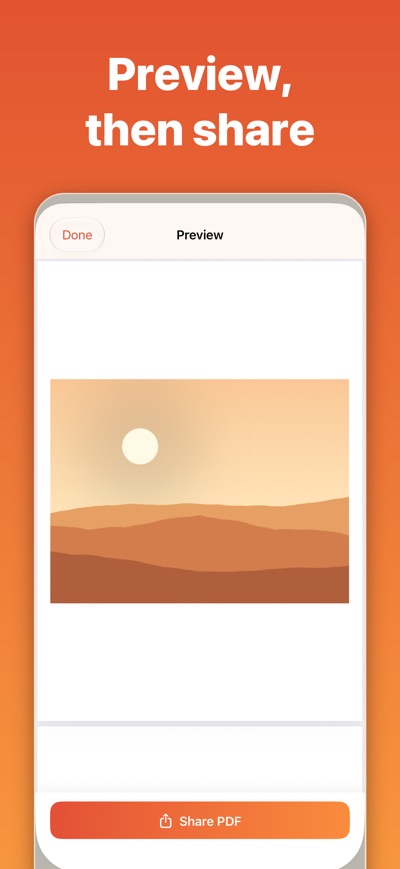
• Preview before exporting
Easy Sharing & Export:
• Share directly to any app
• Save to Files, iCloud, or other cloud services
• Email PDFs with one tap
• Print directly from the app
PERFECT FOR
• Students — Convert handwritten notes and textbook pages
• Professionals — Digitize receipts, contracts, and business cards
• Travelers — Save boarding passes, itineraries, and tickets
• Artists — Create PDF portfolios of your work
• Anyone — Who needs a quick, reliable JPEG-to-PDF converter
DESIGNED FOR SIMPLICITY
No complicated menus or confusing settings. JPEG to PDF is designed to be intuitive from the first tap. Select your photos, customize your layout, and export — it's that simple.
Download JPEG to PDF today and never struggle with JPEG-to-PDF conversion again!
End User License Agreement (EULA):
https://www.apple.com/legal/internet-services/itunes/dev/stdeula/
Privacy Policy:
https://ioscorner.com/privacy.html
AVALW Coverage
Not yet mentioned in AVALW articles.
Similar apps


 MyJio: For Everything JioJio Platforms LimitedTrue 5G, recharges, payments & UPI, music & movies, backup, games, news & more.★ 4.4 27428k


 Microsoft WordMicrosoft CorporationThis application requires a qualifying Microsoft 365 subscription. Microsoft 365 includes premium Word, Excel, and PowerPoint apps, 1 TB cloud storage in OneDri★ 4.8 17535k



 Samsung NotesSamsung Electronics Co, Ltd.(Samsung Notes is optimized for Samsung Galaxy Books. Other computers may have issues running it.) "Samsung Notes allows you to use the enhanced S Pen to write ★ 4.8 15228k



 ChatGPT ClassicOpenAIThe official ChatGPT desktop app brings you the newest model improvements from OpenAI. Do more on your PC with ChatGPT: · Instant answers—Use the [Alt + Space] ★ 4.8 11034k


 ChatGPTOpenAI OpCo, LLCIntroducing ChatGPT for iOS: OpenAI’s latest advancements at your fingertips. This official app is free, syncs your history across devices, and brings you the l★ 4.8 11034k


 Microsoft OutlookMicrosoft CorporationOutlook helps you stay connected and organized at the office and at home with easy access to emails, files, calendar events, and contacts across all your accoun★ 4.3 10673k


 Turbo VPN: Unlimited VPN ProxyINNOVATIVE CONNECTING PTE.LIMITEDDo you want online security and privacy while browsing? Turbo VPN now provides the fastest, reliable and encrypted network. With Turbo VPN, you can get the safe★ 4.7 10243k



 Microsoft ExcelMicrosoft CorporationThis application requires a qualifying Microsoft 365 subscription. Microsoft 365 includes premium Word, Excel, and PowerPoint apps, 1 TB cloud storage in OneDri★ 4.8 9702k
More by this developer


 OBS Remote - Stream ControlHuseyin BaganaTurn your iPhone or iPad into a powerful remote control for OBS Studio! Control your streams and recordings from anywhere in your room — no more running back to-


 SimpleCut: Simple Video EditorHuseyin BaganaSimpleCut removes the ums, uhs and long pauses from your videos, and lets you approve every cut first. Drop in a talking-head video, a podcast or a screen recor-


 Family First: Screen TimeHuseyin BaganaYour family is right there. But are you? Every time you reach for your phone — to scroll, to swipe, to escape — a little moment slips away. A laugh you didn't h-


 Ten, Ta, To? Learn CzechHuseyin BaganaMaster Czech grammatical gender with Ten Ta To - the essential app for learning Czech nouns and their demonstrative pronouns! Czech has three grammatical gender-