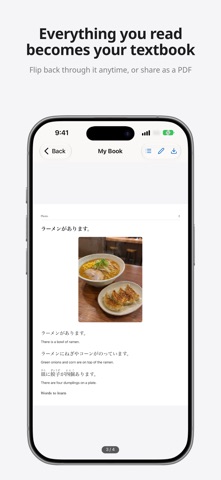
Snap any Japanese and read every kanji. Kanji Reader puts furigana over the text in your photo, explains what it means in your language, and turns what you read into JLPT practice. Made for people learning Japanese: point your camera at a textbook page, a menu, a sign, a manga panel or a letter, and the hiragana reading appears above each kanji. WHAT YOU CAN DO • Read any kanji — take a photo or pick one from your library, crop the part you want, and get the text back with furigana, like 調(しら)べます. Hide the furigana when you want to test yourself, and listen to it read aloud. • See how a sentence works — switch to Grammar and tap a sentence. Each part is color-coded by role (subject, object, predicate…), with grammar points tagged by JLPT level, conjugations step by step, and a translation. • Understand the meaning — tap Explain and AI tells you what the passage says and why it's written that way, in your own language. • Learn from the world around you — on the Photos tab, snap your lunch or the street. AI writes simple Japanese sentences about it, color-coded by grammar, with words to learn, a quick quiz, and answers to your follow-up questions ("What would I say here?"). • Practice for the JLPT — the Exam Prep tab has practice questions for JLPT N5 to N1 and the JFT-Basic, with an explanation for every answer. YOUR OWN TEXTBOOK Save what you read into a Book. Pages keep their order, get a table of contents and turn like a real book, so you can review anytime. Sharing a Book as a PDF is free, even with friends who don't have the app. QUIZZES FROM YOUR OWN PAGES Pick pages from a Book and AI writes questions from that exact text. Give each quiz set a cover, think, then turn the page for the answer and explanation. EXAM PREP: JLPT N5–N1 AND JFT-BASIC Multiple-choice practice for every JLPT level (Kanji & vocabulary, Grammar, Reading) and the JFT-Basic (Script & vocabulary, Conversation & expression, Reading). Take Today's 10 questions or drill one section and track your accuracy. Questions you missed come back until you get them right twice in a row. Furigana can be hidden. GOOD FOR • Studying with the textbook or workbook you already own • Preparing for the JLPT or the JFT-Basic • Reading manga, novels and games in the original • Living or working in Japan: mail, forms, menus, documents • Anyone who speaks some Japanese but gets stuck on kanji FREE AND PREMIUM Free every day: 3 uses for scanning, explaining or describing photos, in any mix, plus up to 3 more by watching a short ad. Grammar for 5 sentences, 5 follow-up questions about your photos and 1 Exam Prep set a day are free too, and reviewing missed questions is always free. Premium: up to 30 AI uses a day (scans, explanations, photo descriptions and quizzes), grammar for up to 50 sentences and 50 photo questions a day, unlimited Exam Prep sets, no caps on Books, quizzes and pages, plus bulk scan. Premium is a monthly auto-renewing subscription; the price is shown in the app before you buy. It renews automatically unless turned off at least 24 hours before the end of the current period. Cancel anytime in Settings > your name > Subscriptions. Terms of Service: https://shofj.com/en/apps/furigana-ai/terms-of-service Privacy Policy: https://shofj.com/en/apps/furigana-ai/privacy-policy Terms of Use (EULA): https://www.apple.com/legal/internet-services/itunes/dev/stdeula/ The JLPT is administered by the Japan Foundation and JEES, and the JFT-Basic by the Japan Foundation. These are original practice questions, not endorsed or approved by the test organizers.
Education · iPhone, iPad, Android · Free