
Screenshots




About Little Things: Task Breakdown
Stuck between "I need to do this" and actually starting? Little Things breaks the task into small steps, so the first one is easy to begin.
Little Things was inspired by my son, who has ADHD. He finished things more easily once they were broken into small pieces. So do I, and so do a lot of people.
Built for ADHD brains, and for anyone whose executive function stalls at the starting line.
BREAK IT DOWN
Do a brain dump, or type one big task and add its steps. Each one gets a size: small, medium or big. On iPhones with Apple Intelligence, a brain dump is sized and turned into steps for you, all on your device.
A DAY THAT FITS
Your to do list for each day follows a simple shape: five small steps, three medium, one big. Small ones come first, so you build momentum before the hard part. Not sure how much you've got in you? Suggest my day asks about your energy and fills the day to match.
ONE THING AT A TIME
Pick a task to work on and its steps fill today. A Live Activity keeps the step you're on in view on the Lock Screen and in the Dynamic Island, with a check to tick it off. A focus timer sized to each step helps you start, not race.
NO STREAKS, NO SHAME
Nothing turns red. Nothing counts what you missed. Steps left over can wait for later, and the app only ever shows what you did.
TOGETHER, IF YOU LIKE
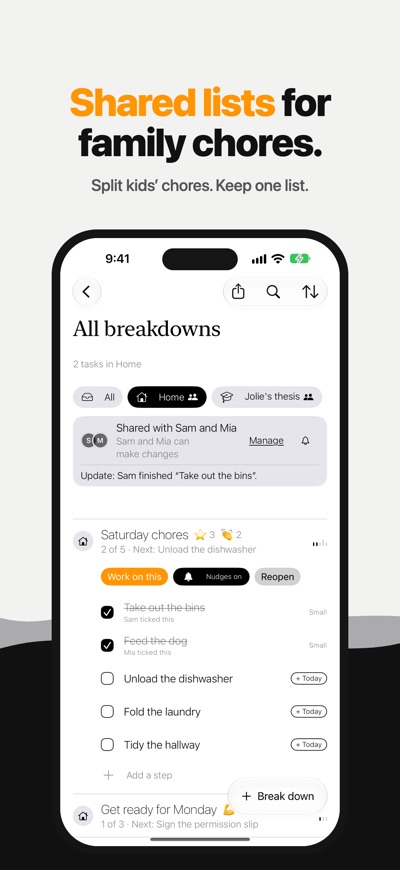
Share a folder through iCloud with family, a partner or an accountability partner. Split kids' chores, keep a shared list, and cheer each other on. Only credit is shown, never who hasn't done something.
EVERYWHERE YOU LOOK
Home Screen and Lock Screen widgets show what's up next and let you tick it off. iCloud keeps iPhone and iPad in step.
LITTLE THINGS PLUS
Your first week has everything. After that, Little Things stays free with a smaller day: one big step, one medium and three small. Plus brings the full day, Suggest my day, Apple Intelligence sizing, and iCloud sync and shared folders. Choose Yearly, Monthly, or Lifetime paid once. Plus can be shared with your family. Nothing you've made is ever locked.
Subscriptions renew automatically unless turned off at least 24 hours before the end of the period, and can be managed in your Apple Account settings.
Terms of Use: https://www.apple.com/legal/internet-services/itunes/dev/stdeula/
Take it one little thing at a time.
AVALW Coverage
Not yet mentioned in AVALW articles.
Similar apps


 MyJio: For Everything JioJio Platforms LimitedTrue 5G, recharges, payments & UPI, music & movies, backup, games, news & more.★ 4.4 27428k


 Microsoft WordMicrosoft CorporationThis application requires a qualifying Microsoft 365 subscription. Microsoft 365 includes premium Word, Excel, and PowerPoint apps, 1 TB cloud storage in OneDri★ 4.8 17535k



 Samsung NotesSamsung Electronics Co, Ltd.(Samsung Notes is optimized for Samsung Galaxy Books. Other computers may have issues running it.) "Samsung Notes allows you to use the enhanced S Pen to write ★ 4.8 15228k



 ChatGPT ClassicOpenAIThe official ChatGPT desktop app brings you the newest model improvements from OpenAI. Do more on your PC with ChatGPT: · Instant answers—Use the [Alt + Space] ★ 4.8 11034k


 ChatGPTOpenAI OpCo, LLCIntroducing ChatGPT for iOS: OpenAI’s latest advancements at your fingertips. This official app is free, syncs your history across devices, and brings you the l★ 4.8 11034k


 Microsoft OutlookMicrosoft CorporationOutlook helps you stay connected and organized at the office and at home with easy access to emails, files, calendar events, and contacts across all your accoun★ 4.3 10673k


 Turbo VPN: Unlimited VPN ProxyINNOVATIVE CONNECTING PTE.LIMITEDDo you want online security and privacy while browsing? Turbo VPN now provides the fastest, reliable and encrypted network. With Turbo VPN, you can get the safe★ 4.7 10243k



 Microsoft ExcelMicrosoft CorporationThis application requires a qualifying Microsoft 365 subscription. Microsoft 365 includes premium Word, Excel, and PowerPoint apps, 1 TB cloud storage in OneDri★ 4.8 9702k


