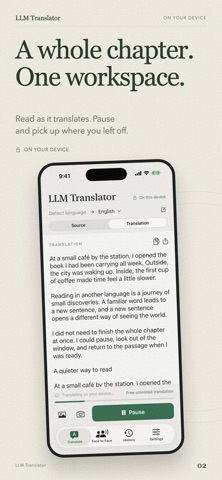
Keep reading across languages. Keep your words on your device. LLM Translator Tool brings AI translation to your device for articles, entire chapters and text in photos. Read a menu abroad, work through foreign-language material or translate personal content without sending it to a translation server. OFFLINE, WITH YOUR PRIVACY IN MIND After downloading a model, translate without an internet connection. Translation, image text recognition and translated image rendering all happen on your device. Your source text, photos and results are not uploaded to a translation server. LONG TEXTS, LESS COPYING Paste an article or a whole chapter. The app divides it into sections automatically and displays the translation as it is generated. Read along, pause when needed and resume from your saved progress. PHOTOGRAPH, TRANSLATE, SEE IT IN THE IMAGE Photograph a menu, sign or printed page, then choose the target language and translate within the camera screen. You can also use an existing image. Read the recognized text and translation together, see translated text placed back into the image, and tap either image to zoom in. FACE-TO-FACE CONVERSATIONS Talk with someone who speaks another language using one device. Each of you holds your own button to speak, and the translation appears on the other person's half of the screen, where it can also be read aloud. Their half turns to face them across the table, with its buttons and hints in their language. Speech is recognized on your device. Requires iOS 26 or later; available languages depend on the speech recognition and voices on your device. EDIT AND TRANSLATE AGAIN Change the source text or target language after a translation finishes, then translate again. Work with Chinese, English, Japanese, Korean, French, German, Spanish and more. HISTORY YOU CAN MANAGE Reopen previous translations to read or translate again. Delete individual entries or clear your history. FREE IN THIS VERSION Text, long-text, image and camera translation are free to use in this version. GET STARTED Download an offline model in Settings. Choose between two models, keep them separately and switch when needed. Models are not included in the app download; the initial model download requires internet access and device storage. Terms of Use (EULA): https://www.apple.com/legal/internet-services/itunes/dev/stdeula/ Support: support@iamdev.me Privacy Policy: https://llm-translator.iamdev.me/privacy Terms of Use: https://llm-translator.iamdev.me/terms
Productivity · iPhone, iPad · Free
Rating: 5.0 out of 5, based on 1 user ratings.