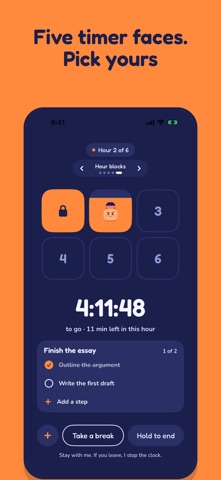
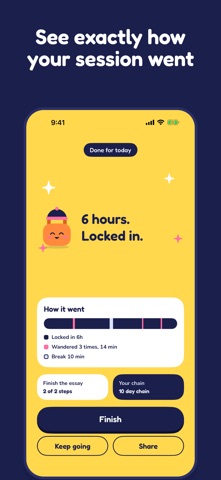
Normal timers keep counting while you scroll. Locked In doesn't. Set how long you want to focus: studying, deep work, writing, practice. Hold to lock in, and the clock runs only while you stay in the app. Switch to another app and Latch, your padlock buddy, stops the clock on the spot. It stays stopped until you come back and tap resume yourself. THE ONE RULE • The clock only counts time you actually stayed. • Leaving pauses it instantly. • Nothing restarts it but you. MADE FOR HOW YOU FOCUS Designed with neurodivergent people in mind, and for anyone whose focus works a little differently. Tell Latch what gets in your way and it sets things up to suit you. Change anything later. • Calm mode: muted colours, a quieter Latch, softer taps and minutes instead of ticking seconds. • Gentle words: kinder wording when you pause, and no count of times you left. • Show time as a shape: turn numbers off and see time as a ring, a disk or words. • Tap instead of hold: every hold becomes a tap and a confirm. • Heads-up: a quiet warning five or ten minutes before the end. • See the time: every session shows when it ends as a time of day ("until 4:30 PM"), and you can keep the date and time on screen. • Just 10 minutes: start small, then keep going if it feels right. • Flow: no end time, the clock counts up. Leaving still stops it. • Focus sounds: pink or white noise while you're locked in. Pause it from the timer any time. • Latch works with you: Latch sits at a little desk and works alongside you. • Small wins: a step ticked, halfway there, welcome back. Lively, quiet or off. LATCH HELPS YOU START (optional) With Apple Intelligence, Latch can lend a hand. Off until you turn it on, written on your device, nothing sent anywhere. • Split it: type a big task and Latch suggests a few small steps. You edit and approve them. • Stuck? Press and hold the step you're on for one smaller way in. • Reminders that mention your next step. No Apple Intelligence? Everything else works the same. WHAT KEEPS YOU THERE • Nudges: Latch calls you back after you leave, once or three times. • Live Activity: your session in the Dynamic Island and on the Lock Screen, with buttons to add time or take a break. • What pulled you away? One optional question when you step away, and what Latch noticed in Your week. • Plan your next session: pick a time, get a reminder, and add it to your calendar if you like. • Breaks that end: pick how long, stretch it if you need to. Break time never counts. • Block apps (iPhone, optional): pick the apps that pull you away and they stay closed while you're locked in. They open again when you end the session or take a break. • Hard mode: no breaks, no extra time, and a ten second wait to quit. MAKE IT YOURS • Seven timer faces: Ring, Fill, Big digits, Flip clock, Hour blocks, Disk and Now. Swipe to switch, even mid-session. • Name your focus and break it into steps. The Now face shows just the step in front of you. • On a roll? Add 15 minutes, 30 minutes or an hour without stopping the clock. • Save set-ups as presets and start them with one tap, or ask Siri for time left, your next step or a break. SEE YOUR PROGRESS • Your week, or your month as a calendar with no streak to break. • Your chain: one link for every day you finish a session. • A recap after each session, and a card to share it. • Latch's closet: hats and colours that unlock as you go. • Widgets for your Home Screen and Lock Screen, and a daily reminder on the days you pick. EVERYWHERE YOU WORK • iPhone and Mac. Your settings, chain, presets and Latch's look stay in step through your own iCloud. PRIVATE BY DESIGN No account. No ads. No analytics. Nothing passes through our servers; we don't have any. Your answers when setting up aren't saved, only the settings they choose. Privacy: https://lockedin-focus-buddy.vercel.app/privacy Terms: https://lockedin-focus-buddy.vercel.app/terms
Productivity · iPhone, iPad · Free