MDB & ACCDB Viewer – Open MDB and ACCDB Files, Export to CSV & XLSX
ProductivityNorthgable
Screenshots
About MDB & ACCDB Viewer – Open MDB and ACCDB Files, Export to CSV & XLSX
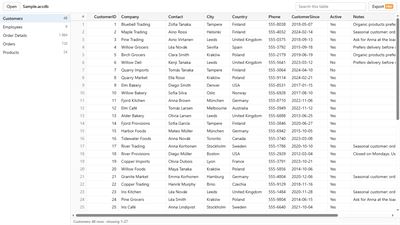
Open the .mdb and .accdb files that Microsoft Access saves (from Access 97 to Microsoft 365), on Windows 10 or 11, without Access installed.
FREE
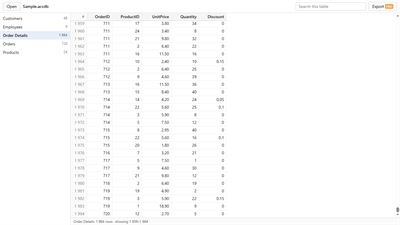
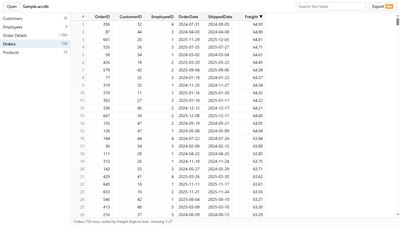
- Every table in the file, with every row and every column: text, numbers, money, dates, yes/no, long texts, attachments (by name) and multi-value fields.
- Big files stay quick: rows load as you scroll, so a table with hundreds of thousands of rows opens without waiting for all of it.
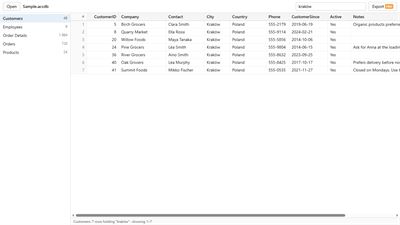
- Search a table: it shows the rows that hold every word you type, in any column.
- Sort a table by any column, up or down.
- See a long text in full (double-click a cell) and copy it.
- Databases with a password: type the password that was set for the file.
- Split databases: a table whose data is kept in another file (a linked table) says which file, and opens that file with one click when it is on your PC.
- No database at hand? Open the built-in sample (a small database we made) to see what the app shows.
PRO, a one-time purchase
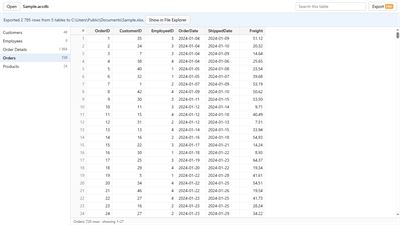
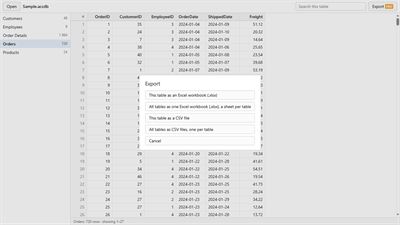
- Export one table or all tables to an Excel workbook (.xlsx), one sheet per table, with numbers kept as numbers.
- Export to CSV files (UTF-8, one file per table) for any spreadsheet or database program.
PRIVATE BY DESIGN
- The app only reads the file, on your PC. It never changes the file and has no account or sign-in. It never sends your file, its contents or its password anywhere. Its only connection is to the Microsoft Store: when you click a Pro button (to check whether you own Pro, or to buy it in the Store's own window), and once, after your first database, when the Store's own rating window opens.
- A database's password is used only to open that file on your PC. It is never stored.
Not in this version: queries, forms, reports and macros are not shown, only tables. Tables linked to a database server (ODBC) are listed, but their data is not in the file.
MDB & ACCDB Viewer is made by Northgable. It is not made by, affiliated with or endorsed by Microsoft. Microsoft Access, Microsoft Excel and Microsoft 365 are trademarks of the Microsoft group of companies.
AVALW Coverage
Not yet mentioned in AVALW articles.
Similar apps


 MyJio: For Everything JioJio Platforms LimitedTrue 5G, recharges, payments & UPI, music & movies, backup, games, news & more.★ 4.4 27428k


 Microsoft WordMicrosoft CorporationThis application requires a qualifying Microsoft 365 subscription. Microsoft 365 includes premium Word, Excel, and PowerPoint apps, 1 TB cloud storage in OneDri★ 4.8 17535k



 Samsung NotesSamsung Electronics Co, Ltd.(Samsung Notes is optimized for Samsung Galaxy Books. Other computers may have issues running it.) "Samsung Notes allows you to use the enhanced S Pen to write ★ 4.8 15228k



 ChatGPT ClassicOpenAIThe official ChatGPT desktop app brings you the newest model improvements from OpenAI. Do more on your PC with ChatGPT: · Instant answers—Use the [Alt + Space] ★ 4.8 11034k


 ChatGPTOpenAI OpCo, LLCIntroducing ChatGPT for iOS: OpenAI’s latest advancements at your fingertips. This official app is free, syncs your history across devices, and brings you the l★ 4.8 11034k


 Microsoft OutlookMicrosoft CorporationOutlook helps you stay connected and organized at the office and at home with easy access to emails, files, calendar events, and contacts across all your accoun★ 4.3 10673k


 Turbo VPN: Unlimited VPN ProxyINNOVATIVE CONNECTING PTE.LIMITEDDo you want online security and privacy while browsing? Turbo VPN now provides the fastest, reliable and encrypted network. With Turbo VPN, you can get the safe★ 4.7 10243k



 Microsoft ExcelMicrosoft CorporationThis application requires a qualifying Microsoft 365 subscription. Microsoft 365 includes premium Word, Excel, and PowerPoint apps, 1 TB cloud storage in OneDri★ 4.8 9702k
More by this developer


 Check Printing & Check WriterNorthgableWrite and print checks from your phone on pre-printed checks. Pay once.-


 PUB File Viewer & PDF ExportNorthgableOpen .pub files on your phone: read them or see every page. No upload, no ads.-


 Flip Clock Face: Split-FlapNorthgableSplit-flap time, 3 complications you pick, 5 colours and a light always-on view-


 1099-NEC Forms & 1096 PrinterNorthgableFill in 2026 1099-NEC forms, add up Form 1096, print on the official red forms.-