
Screenshots
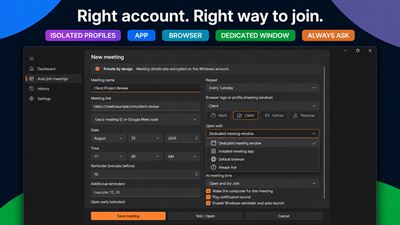
About Meetings: Zoom, Teams, Meet
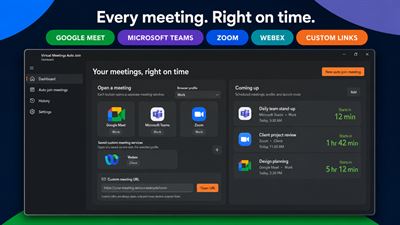
Spend less time finding meeting links and more time ready for your next call. Virtual Meetings Auto Join organizes and opens Zoom, Microsoft Teams, Google Meet and custom meeting URLs from one Windows app. It uses supported web experiences or installed meeting apps; internet access and the meeting provider's sign-in requirements still apply.
Prepare your meetings in a few steps
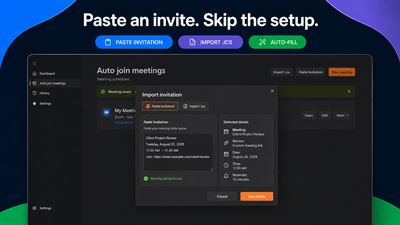
Paste an invitation or import an .ics calendar file, review the meeting details and choose when the link should open. Keep one-time meetings together, receive reminders and review recent launch history. Calendar file import is a manual import; it does not continuously sync a connected calendar.
Choose how each meeting opens
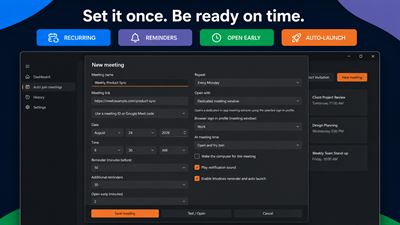
Use a dedicated meeting window, your default browser or an installed meeting app where supported. An app launch can fall back to the browser when needed. Select Always Ask if you prefer to decide at launch time. Dedicated windows use isolated WebView2 profiles, with additional profiles available in Lifetime Pro for separate sign-in sessions.
Plan ahead
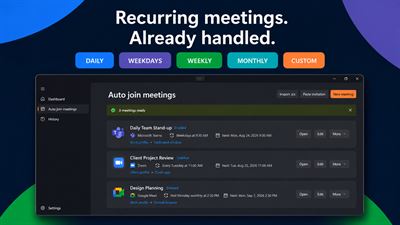
Lifetime Pro adds recurring meetings, multiple profiles and saved services for reuse. Windows Task Scheduler integration can open scheduled links while the main app window is closed. Lifetime Pro also includes wake scheduling on supported systems, subject to Windows power settings.
Lifetime Pro is a paid upgrade with unlimited meeting schedules, recurring meetings, multiple profiles, saved services, wake scheduling and 90 days of history. Check the in-app upgrade screen for the current price before purchasing.
Before your meeting
Your PC must be on and available, or able to wake with the required settings. Task Scheduler must be configured for launching with the app window closed. Automatic launch opens the meeting link; join assistance is best-effort. Sign-in, pre-join choices or host admission may still require your attention.
Virtual Meetings Auto Join is independently developed and is not affiliated with or endorsed by Zoom, Microsoft or Google. Service names belong to their respective owners.
AVALW Coverage
Not yet mentioned in AVALW articles.
Similar apps


 MyJio: For Everything JioJio Platforms LimitedTrue 5G, recharges, payments & UPI, music & movies, backup, games, news & more.★ 4.4 27428k


 Microsoft WordMicrosoft CorporationThis application requires a qualifying Microsoft 365 subscription. Microsoft 365 includes premium Word, Excel, and PowerPoint apps, 1 TB cloud storage in OneDri★ 4.8 17535k



 Samsung NotesSamsung Electronics Co, Ltd.(Samsung Notes is optimized for Samsung Galaxy Books. Other computers may have issues running it.) "Samsung Notes allows you to use the enhanced S Pen to write ★ 4.8 15228k



 ChatGPT ClassicOpenAIThe official ChatGPT desktop app brings you the newest model improvements from OpenAI. Do more on your PC with ChatGPT: · Instant answers—Use the [Alt + Space] ★ 4.8 11034k


 ChatGPTOpenAI OpCo, LLCIntroducing ChatGPT for iOS: OpenAI’s latest advancements at your fingertips. This official app is free, syncs your history across devices, and brings you the l★ 4.8 11034k


 Microsoft OutlookMicrosoft CorporationOutlook helps you stay connected and organized at the office and at home with easy access to emails, files, calendar events, and contacts across all your accoun★ 4.3 10673k


 Turbo VPN: Unlimited VPN ProxyINNOVATIVE CONNECTING PTE.LIMITEDDo you want online security and privacy while browsing? Turbo VPN now provides the fastest, reliable and encrypted network. With Turbo VPN, you can get the safe★ 4.7 10243k



 Microsoft ExcelMicrosoft CorporationThis application requires a qualifying Microsoft 365 subscription. Microsoft 365 includes premium Word, Excel, and PowerPoint apps, 1 TB cloud storage in OneDri★ 4.8 9702k