
Screenshots



About Merge Pdf-Split, Combine Files
Tired of sending multiple PDF files separately?
Merge PDF files into one clean document in seconds. This fast and offline PDF merger lets you combine, organize, and manage files directly on your iPhone—without watermarks or complicated steps.
Whether you're dealing with work documents, study notes, or scanned files, this app helps you combine PDFs quickly, securely, and without losing quality.
Features:
Merge Multiple PDF Files
Combine unlimited PDF files into one organized document instantly.
Fast & Offline Processing
No uploads. No waiting. Everything works directly on your device.
No Watermark
Your files stay clean and professional—always.
Smart File Management:
• Reorder pages before merging
• Combine images into PDF
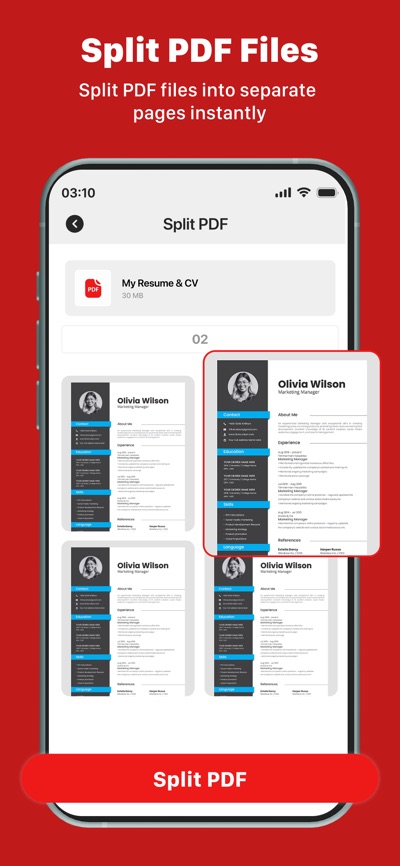
• Split large PDF files
• Compress file size
Real Use Cases:
• Merge assignments into one PDF
• Combine invoices & reports
• Join scanned documents
• Create one file for email sharing
• Organize contracts & forms
Why Choose This PDF Merger?
Unlike complex or bloated alternatives, this app focuses on one thing: fast, simple PDF merging that actually works.
Download now and merge PDF files faster than ever. Combine, organize, and manage your documents with a lightweight and powerful PDF merger built for iPhone.
Note:
STEP 1: Payment will be charged to your iTunes account at confirmation of purchase. Your subscription will automatically renew unless auto-renew is turned off at least 24 hours before the end of the current subscription period.
STEP 2: Your account will be charged for renewal within 24 hours before the end of the current subscription period. Automatic renewals will cost the same price you were originally charged for the subscription.
STEP 3: You can manage your subscriptions and turn off auto-renewal by going to your Account Settings on the App Store after purchase. Read our terms of service and Privacy Policy for more information.
Terms of Use:
https://sites.google.com/view/namigamesstudio/terms-of-use
Privacy Policy:
https://sites.google.com/view/mergepdfapp?usp=sharing
AVALW Coverage
Not yet mentioned in AVALW articles.
Similar apps


 MyJio: For Everything JioJio Platforms LimitedTrue 5G, recharges, payments & UPI, music & movies, backup, games, news & more.★ 4.4 27428k


 Microsoft WordMicrosoft CorporationThis application requires a qualifying Microsoft 365 subscription. Microsoft 365 includes premium Word, Excel, and PowerPoint apps, 1 TB cloud storage in OneDri★ 4.8 17535k



 Samsung NotesSamsung Electronics Co, Ltd.(Samsung Notes is optimized for Samsung Galaxy Books. Other computers may have issues running it.) "Samsung Notes allows you to use the enhanced S Pen to write ★ 4.8 15228k



 ChatGPT ClassicOpenAIThe official ChatGPT desktop app brings you the newest model improvements from OpenAI. Do more on your PC with ChatGPT: · Instant answers—Use the [Alt + Space] ★ 4.8 11034k


 ChatGPTOpenAI OpCo, LLCIntroducing ChatGPT for iOS: OpenAI’s latest advancements at your fingertips. This official app is free, syncs your history across devices, and brings you the l★ 4.8 11034k


 Microsoft OutlookMicrosoft CorporationOutlook helps you stay connected and organized at the office and at home with easy access to emails, files, calendar events, and contacts across all your accoun★ 4.3 10673k


 Turbo VPN: Unlimited VPN ProxyINNOVATIVE CONNECTING PTE.LIMITEDDo you want online security and privacy while browsing? Turbo VPN now provides the fastest, reliable and encrypted network. With Turbo VPN, you can get the safe★ 4.7 10243k



 Microsoft ExcelMicrosoft CorporationThis application requires a qualifying Microsoft 365 subscription. Microsoft 365 includes premium Word, Excel, and PowerPoint apps, 1 TB cloud storage in OneDri★ 4.8 9702k
More by this developer


 Coverly : AI Album Cover MakerMomina Khalid## Create Stunning Album Covers with AI Turn your music ideas into unique, eye-catching album artwork in seconds with **AI Album Cover Generator**. Whether you'-


 Quit ZYN & SNUS: Nixli TrackerMomina Khalid## Break Free from ZYN, SNUS & Nicotine Pouches with Nixli Ready to quit ZYN, snus, dip, or oral nicotine pouches for good? Make every pouch-free day count with-


 AU Citizenship Test Prep 2027Momina Khalid## Master the Australian Citizenship Test with Confidence AU Citizenship Test Prep 2027 provides a comprehensive, structured study routine based on the official-


 Medical Scribe - Ai AssistantMomina Khalid## Your AI Medical Scribe & Clinical Companion for Smarter Healthcare Meet Medical Scribe - AI Assistant, the next-generation clinical documentation and referen-