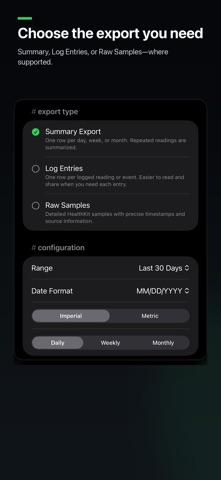
YOUR APPLE HEALTH DATA, READY FOR YOUR TOOLS Turn selected Apple Health data into clear, portable CSV files for spreadsheets, scripts and other tools you choose. Select your metrics, dates and level of detail. Processing stays on your device, with no account or automatic uploads. BRING CONTEXT TO YOUR DATA An optional Analysis Kit packages your CSV with a guide to its columns, units, dates, missing-data rules and known limitations. Log Entries and Raw Samples kits also include structured metadata. Saved Summary presets can include your own Analysis Notes. Use the files with a spreadsheet, script or external AI assistant. MetricPull does not run an AI model or connect to AI services. MAKE REPEAT EXPORTS EASY Start with ten built-in presets or save your own export settings. Reuse your chosen metrics, dates, units, grouping and Analysis Kit preference. Group saved presets into a batch and run several exports together. Review each preset, skip the ones you do not need this time, and follow progress and individual outcomes. Each preset keeps its own settings and produces its own output. SEE TRENDS BEFORE YOU EXPORT Quick Metrics brings daily values, rolling averages and comparisons together in on-device charts. Explore patterns in your available data before deciding what to export. CHOOSE THE DETAIL YOU NEED Choose from 70 Apple Health metrics across Body, Activity, Heart, Sleep, Vitals and Nutrition. - Summary: Daily, weekly or monthly rows for trends and comparisons, with multiple compatible metrics in one file. - Log Entries: Readable individual measurements, events, supported sleep records and workouts. - Raw Samples: Detailed HealthKit records with precise timestamps, available source and device information, and record identifiers. Detailed exports support selected metrics. Record exports use one metric at a time, except the paired Blood Pressure values. Ordinary Heart Rate supports Raw Samples; Time Asleep supports stored sleep segments. Workouts preserve stored records without reconstructing routes, pauses or overlapping sessions. PRIVACY BY DESIGN - Read-only Apple Health access - Processing and export storage on your device - No accounts or MetricPull cloud backend - No analytics or tracking SDKs - No automatic uploads - You choose when and where to share MORE WAYS TO REUSE YOUR WORK Share Export Templates or bundles so someone else can reuse your settings. Templates contain configuration and any notes you include, never recorded Health data. The recipient reviews the settings and chooses what to export and share. Completed exports stay on your device for later sharing. MetricPull helps you use your Apple Health data on your terms. It does not diagnose conditions, prescribe treatment, monitor emergencies or provide medical advice.
Health & Fitness · iPhone, iPad · Free