Screenshots




About MyNotebook - simple note app -
"My Notebook" Overview
it is suitable for creating checklists, to-do lists, and writing diaries by genre using short sentences. And you may be even trained the ability to create short sentences. Text size can be changed by simply pinching the screen.
(1) Notepad function
● Start up ; The display will start from the last finished page and it will be possible to edit.
● Page structure ; Consists of one title and 32 lines body.
● Font resizes ; When more than limited number of text is entered, font size automatically become smaller.
● Page turning ; Swipe the screen left / right or tap the left / right frame to page forward.
● Turning speed ; If you set the "Mode" button to "5", you can send 5 pages, if you set it to "1", you can send 1 page at a time.
● Infinite loop; Since it uses an infinite loop type page turning, the page is turned from the page near the rear end to the page near the front end when moving forward, and in the reverse direction when reversing.
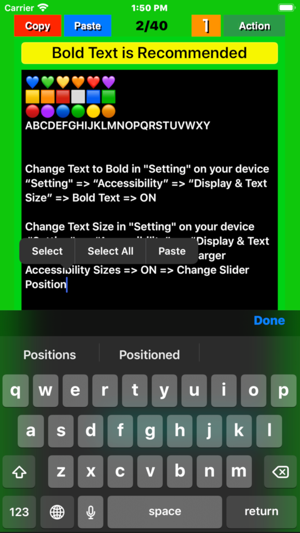
● Character input; Tapping a position where you want to enter a character a cursor appears and a keyboard also appears at the bottom of the screen. Using the keyboard you can enter any character at the cursor position.
● "Done" button; Tapping the "Done" button, you can save the text you entered to your device's memory, for the next startup.
(2) "Copy" function
By tapping the "Copy" button on each page, the entered title and text will be stored in the device's memory. The text is also copied to the clipboard.
(3) "Paste" function
● When you tap the "Paste" button on each page, a screen will pop up asking if you want to overwrite the page with the title and text saved in memory. Tap "Overwrite" on that screen to execute overwriting.
● You can erase all the characters at once by copying a blank page and pasting it on any page.
(4) Table of contents creation function
If you press the Paste button for a few seconds, a screen will pop up asking if you want to create a table of contents. Select Create to create a table of contents.
(5) "Mail" function
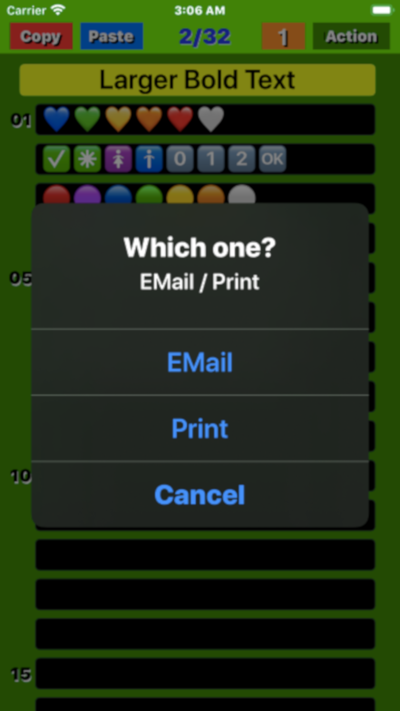
On any page, click the "Action" button, and a selection screen for email or print appears. Select an email and follow the instructions on the email screen. After setting and confirming the title, destination, Cc / Bcc, and sender, click the "Send" button to send, or the "Cancel" button to cancel.
(6) "Print" function (v1.5)
On any page, click the "Action" button, and a selection screen for email or print appears. Select "Print" and follow the instructions on the print screen. After selecting and checking the printer selection, number of prints, and print page range, press "Print" to execute printing. If you want to cancel, press "Cancel".
AVALW Coverage
Not yet mentioned in AVALW articles.
Similar apps


 MyJio: For Everything JioJio Platforms LimitedTrue 5G, recharges, payments & UPI, music & movies, backup, games, news & more.★ 4.4 27428k


 Microsoft WordMicrosoft CorporationThis application requires a qualifying Microsoft 365 subscription. Microsoft 365 includes premium Word, Excel, and PowerPoint apps, 1 TB cloud storage in OneDri★ 4.8 17535k



 Samsung NotesSamsung Electronics Co, Ltd.(Samsung Notes is optimized for Samsung Galaxy Books. Other computers may have issues running it.) "Samsung Notes allows you to use the enhanced S Pen to write ★ 4.8 15228k



 ChatGPT ClassicOpenAIThe official ChatGPT desktop app brings you the newest model improvements from OpenAI. Do more on your PC with ChatGPT: · Instant answers—Use the [Alt + Space] ★ 4.8 11034k


 ChatGPTOpenAI OpCo, LLCIntroducing ChatGPT for iOS: OpenAI’s latest advancements at your fingertips. This official app is free, syncs your history across devices, and brings you the l★ 4.8 11034k


 Microsoft OutlookMicrosoft CorporationOutlook helps you stay connected and organized at the office and at home with easy access to emails, files, calendar events, and contacts across all your accoun★ 4.3 10673k


 Turbo VPN: Unlimited VPN ProxyINNOVATIVE CONNECTING PTE.LIMITEDDo you want online security and privacy while browsing? Turbo VPN now provides the fastest, reliable and encrypted network. With Turbo VPN, you can get the safe★ 4.7 10243k



 Microsoft ExcelMicrosoft CorporationThis application requires a qualifying Microsoft 365 subscription. Microsoft 365 includes premium Word, Excel, and PowerPoint apps, 1 TB cloud storage in OneDri★ 4.8 9702k