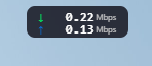
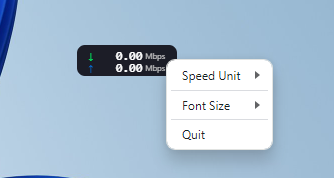
Transform your desktop with NetSpeedlive, a lightweight and elegant floating widget that displays your internet speed in real-time. Whether you're streaming, gaming, downloading, or just browsing, keep track of your network performance at a glance. ✨ KEY FEATURES 📊 Real-Time Speed Monitoring - Live download and upload speed tracking - Updates continuously to show your current network performance - Accurate measurements using system-level network statistics 🎨 Sleek & Minimal Design - Beautiful, modern interface that blends seamlessly with your desktop - Compact floating widget that stays out of your way - Clean display with clear upload (↑) and download (↓) indicators ⚙️ Customizable Display - Switch between Mbps, MBps, or GBps units - Adjustable font size for better visibility - Right-click context menu for quick settings access 🖱️ Fully Draggable - Position the widget anywhere on your screen - Stays on top of other windows (always visible) - Remembers your preferred position 🪶 Lightweight & Efficient - Minimal system resource usage - No impact on your network performance - Fast startup and smooth operation 💡 PERFECT FOR - Content creators monitoring upload speeds during streaming - Gamers keeping an eye on connection stability - IT professionals tracking network performance - Anyone curious about their real-time internet speed - Remote workers ensuring stable connections 🚀 HOW IT WORKS Simply launch NetSpeedlive and it will automatically start monitoring your network activity. The widget displays your current download and upload speeds in real-time, updating every second. Drag it to your preferred screen position, right-click to adjust settings, and you're all set! NetSpeedlive monitors network activity locally on your device and does not collect, store, or transmit any personal data.
Utilities · Windows · Free