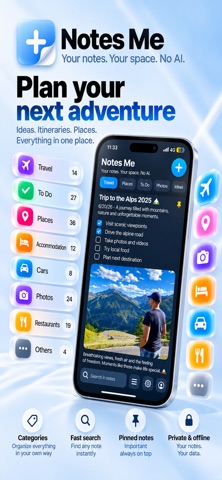
Big screen. Bigger ideas. Meet the new Notes Me. Built to make the most of iPhone Duo—and everything you want to remember. MADE FOR IPHONE DUO • Unfold for more room to write and a compact two-column notes grid. • Open two notes side by side on unfolded Duo or landscape iPad. • Keep your current note open as you fold and unfold. YOUR NOTES, AT A GLANCE • Add cover images from your photo library or choose a picture already inside your note. • Keep your latest three notes on your Home Screen with the medium widget. • Pin important notes to the top and find what you need with text search. EVERYTHING IN ONE PLACE • Create custom categories for travel, work, books, personal plans, and more. • Bring ideas together with text, photos, documents, and checklists. • Plan trips, save places, compare options, and keep useful details close. • Write offline and keep working wherever inspiration finds you. A CLEANER WAY TO WRITE • Enjoy a minimalist editor with notes that slide in from the right. • View large images across the available note width and resize them proportionally. • Make text your own with headings, bold, italic, underline, lists, and links. • Adjust text size, Home Screen titles, and line spacing. • Set reminders for notes or checklist tasks, and revisit previous versions. Plus, refined iPad layouts and performance improvements when browsing and resizing notes. Your notes. Your space. No AI. Terms of Use (EULA): https://www.apple.com/legal/internet-services/itunes/dev/stdeula/
Productivity · iPhone, iPad · Free
Rating: 5.0 out of 5, based on 1 user ratings.