
Screenshots




About Orbit: LiDAR 3D Scanner
Orbit turns real objects into detailed 3D models and rooms into measured floor plans, right on your iPhone or iPad. It needs the LiDAR Scanner: iPhone 12 Pro or later Pro models, or iPad Pro with M1 or later. Other models can install Orbit but can't scan.
Scan as much as you like, for free. There's no account to create, nothing is uploaded and you never pay per scan.
Made for 3D printing, AR, game assets, planning a renovation and keeping a true-to-scale record of the things you make or find.
THREE WAYS TO SCAN
• Object: walk around an object while Orbit photographs it from all around.
• Area: scan what you can't walk around, like a wall, a carving or a patch of ground.
• Floor Plan: walk through a room to get a measured plan with its walls, doors, windows and furniture. Save one room, or keep adding adjoining rooms to the same plan.
For Object and Area, Orbit takes the photos automatically, or you can tap the shutter yourself. Save a capture as a draft and build the 3D model later.
ON YOUR DEVICE
• Everything is built on your iPhone or iPad: 3D models with Apple's Object Capture, which combines photogrammetry with LiDAR depth, and floor plans with Apple's RoomPlan.
• Your scans are never uploaded. No ads and no tracking. Analytics are off unless you turn them on.
• Works offline, so you can scan anywhere.
VIEW, MEASURE AND EDIT
• A 3D viewer with studio lighting, wireframe and real-world dimensions.
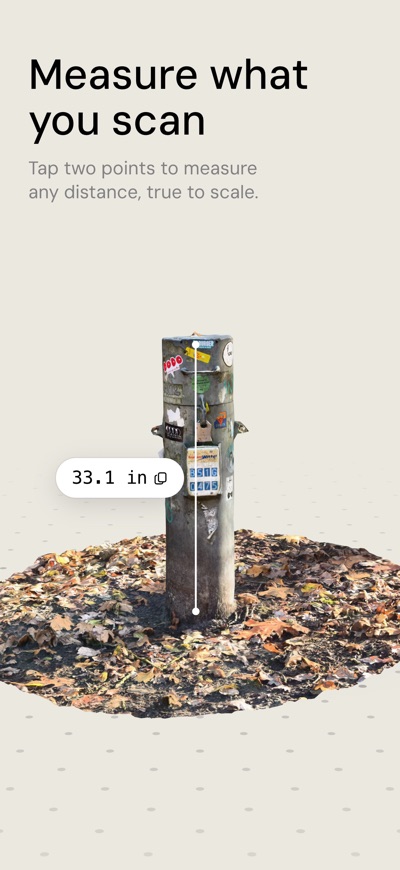
• Measure: tap two points on a scan to see the distance between them, true to scale.
• View in AR to see a scan in the real world.
• Floor plans open as a 2D drawing with room areas and wall lengths. Tilt the plan into a 3D cutaway to look inside.
• Turn, crop, resize, move and recolor a 3D model. Crop cuts away what the model stands on, leaving a flat base, and trims what's around it. Saving edits needs Orbit Pro.
EXPORT
• USDZ, GLB and OBJ export is free, for AR, the web, Blender and most 3D apps.
• With Orbit Pro: STL and 3MF for 3D printing (true scale, in millimeters or inches, upright on the build plate), FBX for game engines and PLY with color.
• Floor plans export as USDZ for free. With Orbit Pro, share a measured PDF drawn to scale for A4 or US Letter, in metric or feet and inches.
• Share in one tap, or drag a scan into another app on iPad.
AND MORE
• Smart names: on devices with Apple Intelligence, Orbit names each new scan for you.
• Siri and Shortcuts: start a scan, open one, or export one as a step in your own shortcut.
• Find your scans in Spotlight.
ORBIT PRO
Scanning, measuring and USDZ, GLB and OBJ export are free, with no limit. Orbit Pro is an optional one-time purchase that adds:
• STL, 3MF, PLY and FBX export
• Measured floor plan PDFs
• Saving edits
• Process Again: rebuild a model from its photos with different settings
• Source Photos: export your original capture photos
• File names without the "Scanned for free with Orbit" suffix
Pay once and keep Pro forever. No subscription.
Terms of Service: https://rutgerschimmel.notion.site/Terms-of-Service-0480a6b6c00e418ebcc3086bd953155e
Privacy Policy: https://rutgerschimmel.notion.site/Privacy-Policy-ab97c3f64c59434d8c36c1349452068f
AVALW Coverage
Not yet mentioned in AVALW articles.
Similar apps


 MyJio: For Everything JioJio Platforms LimitedTrue 5G, recharges, payments & UPI, music & movies, backup, games, news & more.★ 4.4 27428k


 Microsoft WordMicrosoft CorporationThis application requires a qualifying Microsoft 365 subscription. Microsoft 365 includes premium Word, Excel, and PowerPoint apps, 1 TB cloud storage in OneDri★ 4.8 17535k



 Samsung NotesSamsung Electronics Co, Ltd.(Samsung Notes is optimized for Samsung Galaxy Books. Other computers may have issues running it.) "Samsung Notes allows you to use the enhanced S Pen to write ★ 4.8 15228k



 ChatGPT ClassicOpenAIThe official ChatGPT desktop app brings you the newest model improvements from OpenAI. Do more on your PC with ChatGPT: · Instant answers—Use the [Alt + Space] ★ 4.8 11034k


 ChatGPTOpenAI OpCo, LLCIntroducing ChatGPT for iOS: OpenAI’s latest advancements at your fingertips. This official app is free, syncs your history across devices, and brings you the l★ 4.8 11034k


 Microsoft OutlookMicrosoft CorporationOutlook helps you stay connected and organized at the office and at home with easy access to emails, files, calendar events, and contacts across all your accoun★ 4.3 10673k


 Turbo VPN: Unlimited VPN ProxyINNOVATIVE CONNECTING PTE.LIMITEDDo you want online security and privacy while browsing? Turbo VPN now provides the fastest, reliable and encrypted network. With Turbo VPN, you can get the safe★ 4.7 10243k



 Microsoft ExcelMicrosoft CorporationThis application requires a qualifying Microsoft 365 subscription. Microsoft 365 includes premium Word, Excel, and PowerPoint apps, 1 TB cloud storage in OneDri★ 4.8 9702k