
Screenshots


About PdfNotes+
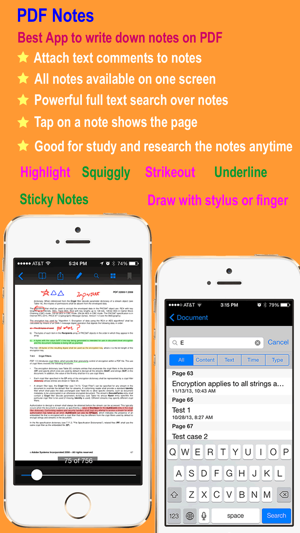
PdfNotes+ is a notes-taking iOS universal app which provides the capability to make notes on PDF documents and manipulate PDF documents. It gives you the ability to take notes by handwriting and make your iOS device a magic notebook. It also enable you to read, annotate, print, manage, and share your notes and PDF files. Using PdfNotes+, it is simple to take notes and browse notes, sign a PDF document, annotate PDF documents, add bookmarks, highlight text, search text over all the pages, draw anything with a touch pen or just your finger.
PdfNotes+ has a simple but powerful built-in file management system, so it is very easy to import notes and PDF files into PdfNotes+ or export them from PdfNotes+.
Features:
1. Take handwriting notes
1) You can take handwriting notes directly on your iOS device with finger or stylus.
2) You can record audio while you are taking notes by handwriting.
3) The audio recorded is stored together with your handwriting notes so you can review your notes later against the audio.
4) You can zoom in to make more room for your handwriting.
5) You can erase any handwriting notes with the Eraser tool.
6) You can change color or line width of your handwriting.
7) Paper-like smooth and comfortable experience and process of notes-taking.
8) You can add handwriting notes into a PDF document.
9) You can access handwriting notes directly from a PDF document.
10) You can print handwriting notes onto paper via AirPlay-compatible printers.
11) You can turn handwriting notes into a PDF document.
12) Free style drawing
2. Annotate PDF documents
1) Write down notes on your PDF documents and browse them later.
2) Highlight text with different colors, and link text notes with it.
3) Underline text with different colors, and link text notes with it.
4) Squiggly text with different colors, and link text notes with it.
5) Strikeout text with different colors, and link text notes with it.
6) Add sticky notes.
7) Draw anything with a touch pen or just your finger, and link text notes with it.
8) Sign PDF documents.
9) Add bookmarks to remember the important pages.
10) Powerful full text search for your notes on the PDF document.
3. Manipulate PDF Documents
1) Merge two PDF documents.
2) Delete pages from PDF documents.
3) Extract pages from PDF documents.
4) Reorder pages in PDF documents.
4. Read PDF Documents
1) Browse a PDF Document using its outlines and bookmarks.
2) Browse a PDF Document using its links.
3) Powerful but simple to use full text search helps you find any text in your PDF document quickly and easily.
4) Browse a PDF Document using the notes you have taken.
5) Open password-protected PDF documents with a valid password.
6) Browse a PDF Document using thumbnail view.
5. PDF document sharing
1) Open PDF files directly from your email.
2) Send out PDF documents by email.
3) Print PDF document with your notes via AirPrint.
4) Print PDF document without your notes via AirPrint.
5) Open PDF files directly from any other apps which provide the ability to open a PDF file in another app.
6) Provide the ability to open a PDF file in another app.
7) Download from Dropbox or upload into Dropbox.
8) Download from GoogleDrive or upload into GoogleDrive.
9) Download from Sky Drive or upload into Sky Drive.
10) Download from Box or upload into Box.
11) Send and receive PDF files via AirDrop from iOS Device nearby made in 2013 or later.
6. File Management
1) Create folder or delete folder.
2) Copy, move, and delete a PDF or notes file.
3) Rename a folder.
4) Rename a notes or PDF file.
5) Display number of files in a folder.
6) Display file size and last modified date for a file.
7) Display statistics of a notes or PDF document, such as last open time, current page, etc.
8) Provide unlimited depth for folders(you can create subfolder of unlimited sub level).
AVALW Coverage
Not yet mentioned in AVALW articles.
Similar apps


 Booking.com for BusinessBooking.comManage your business travel with the Booking.com for Business app! Book trips and manage expenses in just a few minutes. - Book your whole business trip in one ★ 4.8 6450k


 ADP Mobile SolutionsADP, IncADP Mobile Solutions provides you with an easy and convenient way to access payroll, time & attendance, benefits, and other vital HR information for you and you★ 4.7 4460k


 Indeed Job SearchIndeed Inc.Discover your next job opportunity on Indeed, the free job search app designed to connect you with better work anytime, anywhere. Forget the other job search ap★ 4.8 4078k


 Microsoft TeamsMicrosoft CorporationWhether you’re connecting with your community for an upcoming activity or working with teammates on a project, Microsoft Teams helps bring people together so th★ 4.8 3378k


 Zoom WorkplaceZoom Communications, Inc.Zoom Workplace helps you streamline your day and collaborate effortlessly with the power of AI. Zoom Workplace brings video meetings, chat, phone, appointment s★ 4.7 3244k


 DoorDash - DasherDoorDash, Inc.Enjoy the freedom to be your own boss and earn money on your schedule. Plus, get 100% of your tips, always. * CASH AFTER EVERY DASH * Get paid right after every★ 4.7 2464k


 Duo MobileDuo Security LLCDuo Mobile works with Duo Security's two-factor authentication service to make logins more secure. The application generates passcodes for login and can receive★ 4.9 2306k


 Naukri: Job Search Appinfoedge.comSearch jobs, apply fast, and get noticed by 5 lakh+ recruiters hiring in India★ 4.5 2024k
More by this developer


 PdfManUMateYPdfMan is a PDF iOS universal app which provides the capability to view PDF documents and manipulate PDF documents. It gives you the ability to read, print, man-


 Agile Math +UMateYPractice and improve your math competence all by yourself, or challenge your friends or anyone in the world with your Math competence in Agile Math. How fast ca★ 1.3 3


 zCountriesUMateYzCountries is a mobile tool for those interested in travel geography, and knowing more about the world. It provides four different views for the list of countri-


 PDF NotesUMateYPDF Notes is a professional universal iOS PDF viewer which provides the capability to make notes on PDF documents. It gives you the ability to read, annotate, p★ 1.0 1