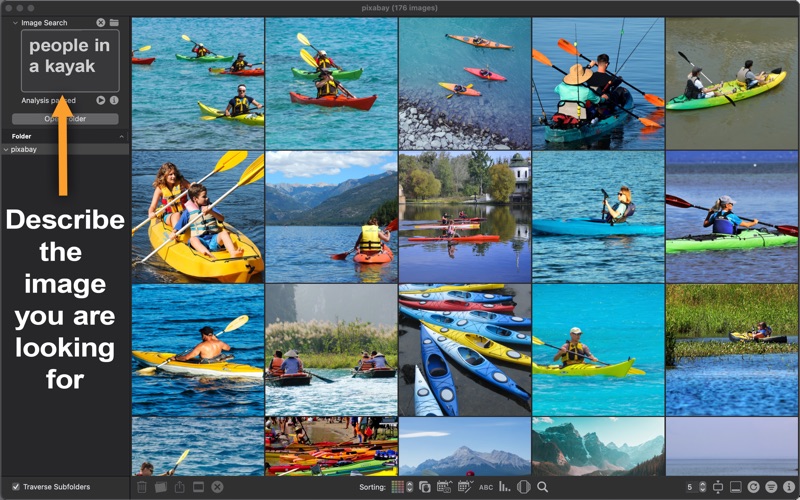
Say goodbye to endless scrolling in Finder. PicArrange transforms the way you explore, search, and clean up local image files on your Mac with smart visual sorting and multiple search capabilities. Note: PicArrange is designed to manage direct image files stored on your local drives, external disks, or network storage. It is not designed to manage images inside the Apple Photos app library. Whether you are managing tens of thousands of photos, clearing out duplicates across scattered folders, or searching for a specific visual style, PicArrange groups, organizes, and searches your images based on their actual content, not just their creation date or file name. 5 Smart Ways to Find Photos • Visual Content & Color: Explore images sorted in intuitive 1D or 2D grids by visual similarity. • Textual AI Search: Search with prompts like "red sports car" or "dog on a beach". • Image & Clipboard Search: Drag in a reference photo or paste one to find similar visual styles. • Location Matching: Easily find photos taken near any image using its embedded GPS data. • Metadata Filtering: Filter and sort by EXIF, IPTC, aspect ratios, file names, and tags. File Management & Workflow • Duplicate Cleanup: Auto-mark duplicates across directories, export CSV reports, or delete files. • Direct File System Control: Rename, move, copy, and manage files & folders on local or network drives. • Pro Viewer: Slideshows with video playback, SDR/HDR toggles, and instant zoom/pan controls. • Seamless Integration: Drag images to other apps, set hotkeys for favorites, and share instantly. Key Features • Direct support for local folders, external disks, and network drives • AI text-to-image and visual similarity search (requires Apple silicon) • Spatial similarity sorting in 1D or 2D • Automated duplicate detection and batch cleanup • Deep metadata search (EXIF, IPTC, GPS, aspect ratio) • Full-screen slideshows with video controls (speed, loop, direction) • File management: organize files and folders and rename items Developers: Klaus Jung & Kai Barthel
Photo & Video · iPhone, iPad · Free