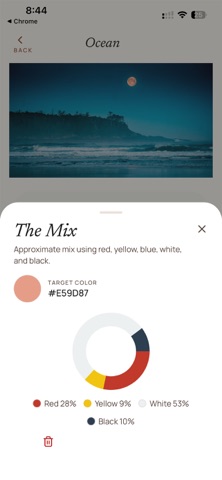
Stop guessing. Start mixing. Whether you’re capturing a sunset or finishing a still life in the studio, getting the exact color match can be a frustrating game of trial and error. Pigment removes the guesswork, giving you a precise mixing guide based on the five colors every painter has: White, Black, Red, Yellow, and Blue. How it works: 1. Take a photo or select one from your library. 2. Sample using a magnifier to pinpoint the exact hue you want to replicate. 3. Instantly see a percentage-based recipe (e.g., 40% Yellow, 20% Blue, 40% White) to create that color using your physical paints. 4. Save your sampled colors into custom palettes for different projects. Designed for Artists No cluttered menus or intrusive ads. Pigment features a refined aesthetic that stays out of your way so you can focus on your canvas. It feels less like an app and more like a high-end studio tool. Local and Private Your creativity is yours alone. Pigment is built with a "local-first" philosophy. Your photos and palettes are stored directly on your device—never in the cloud. No accounts, no logins, and no data tracking. Key Features: Precision Magnifier: A fluid, high-performance loupe for pixel-perfect color sampling. Subtractive Color Engine: Logic calibrated for physical paint mixing, not just digital pixels. Project Management: Organize your inspiration into separate projects and palettes. Lightweight Performance: Built with React Native and SQLite for a fast, snappy experience that won't lag when you're in the zone. Master your color theory. Download Pigment and hit the right hue every time.
Photo & Video · iPhone, iPad · Free