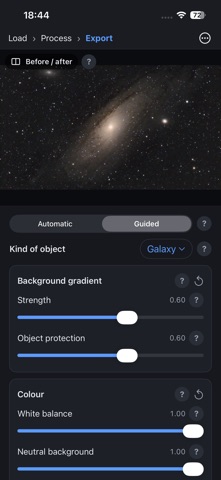
PixAstro turns the frames from your astrophotography session into a presentable final image, right on your iPhone and without needing to know the theory. Pick the folder with the frames from your ASIAIR, your camera or your capture software (USB drive, Files or iCloud Drive), or bring them straight from your ASIAIR's internal storage over Wi-Fi, and press Process. PixAstro does the rest: • Works out what each file is: lights, darks, flats and bias (from the FITS header, the name or the content). • Calibrates, measures the quality of every frame and drops blurry, trailed or cloudy ones. • Aligns the stars and stacks while removing satellites, planes and hot pixels. • Removes the background gradient, calibrates colour, stretches without burning out bright areas, reduces noise and stars and enhances local contrast. • Detects the kind of object (nebula, galaxy, cluster or Milky Way) and adapts the processing. Automatic mode, or Guided mode with sliders for every step, live preview and a before/after comparison. Every concept comes with a one- or two-sentence explanation. Made to be used next to the telescope: • Red night mode, so you keep your dark adaptation. • Works offline and never sends any data. • Your original files are never changed. Processing and adjusting are free. PixAstro Pro, a one-time purchase, unlocks saving the result as 16-bit TIFF, 32-bit FITS, PNG or JPG and sharing it. Formats: uncompressed FITS (mono, colour and Bayer), 16/32-bit TIFF, PNG and JPG. DSLR RAW files cannot be read on the iPhone yet; process them with PixAstro for Windows, macOS or Linux, which is free. Same processing engine as the desktop version.
Photo & Video · iPhone, iPad, Android · Free