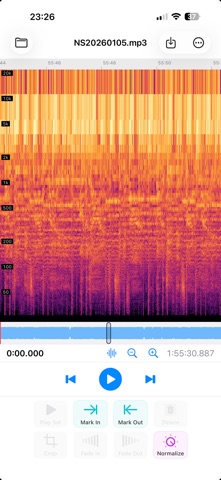
QAudioEditor is a lossless audio editor for iPhone (including iPhone Duo) and iPad. Open an MP3, AAC (.aac), M4A (.m4a), Apple Lossless, FLAC, or WAV file - or a video (MP4, MOV, M4V) to edit just its audio - see its waveform, and cut, crop, fade, normalize, copy/paste, or append audio - then save without re-encoding. Untouched audio is preserved byte-for-byte; only faded or normalized regions are adjusted, and always losslessly - MP3 and AAC by rewriting the codec's gain fields, and WAV, ALAC and FLAC in the sample domain - so there is no generation loss. SUPPORTED FORMATS - MP3 (MPEG-1/2 Layer III, constant or variable bitrate) - AAC - AAC-LC, HE-AAC and HE-AAC v2 - in ADTS (.aac) - AAC in MP4 (.m4a) - Apple Lossless / ALAC in M4A (.m4a) - FLAC (.flac), 16- and 24-bit - WAV / PCM (.wav), 8- to 32-bit and 32-bit float - Video (.mp4, .mov, .m4v) - the audio track is extracted losslessly for editing FEATURES - Frame-accurate cut, crop, and trim - Split markers - drop markers anywhere, drag them to fine-tune, and name them; split a long recording into files in one step, each named and tagged after its marker (Pro) - Markers at Silences - finds the pauses between the tracks of a recording, such as an album saved as one file, and drops a marker in each, ready to split (Pro) - Chapters (Pro) - save markers as chapters in MP3 and M4A/M4B, for podcasts and audiobooks; chapters in a file you open become named markers - ReplayGain tags - measure the loudness and tag the file so players level the volume, with no change to the audio (MP3, M4A, FLAC) - CUE sheets - import a .cue file as markers, or export your markers as .cue - Loudness - LUFS, peak and loudness range in File Details - Trim Silence (Pro) - cut the silence at the start and end in one step - Export Selection - save just the selected part as a new file - Very large recordings - multi-gigabyte WAV and FLAC files open, edit and save smoothly; the audio is kept on disk instead of in memory - Lossless fades and one-tap normalize - Pull the audio out of a video (MP4, MOV, M4V) - open it, or insert it at the playhead; AAC and ALAC tracks are extracted with no re-encoding - Cut, copy, paste, and insert or append other files of the same format - Hardware-keyboard shortcuts on iPad - Playback follows the view - scroll to another part while playing and it plays from there - Rich waveform with peak + RMS view, zoom that stays centered on the playhead, and an overview navigator - Spectrogram view - see the frequency content over time on a log scale; toggle it with the waveform - File details, unlimited undo, and crash-safe session restore - Edit tags - title, artist, album and cover artwork - saved losslessly (MP3, M4A/AAC, FLAC) - Export raw AAC as a seekable .m4a - Record Stream (Pro) - record an internet audio stream (Icecast, SHOUTcast or HLS; MP3, AAC or FLAC) without re-encoding, until you stop it or for a set time, then edit the recording, with a marker named after each song - it keeps recording with the screen locked - Shortcuts actions - Normalize, Write ReplayGain Tags, Trim Silence, Split at Silences and Record Stream Free to edit and to save results up to 5 minutes long. QAudioEditor Pro (a one-time purchase) removes the length limit so you can save recordings of any length, and adds Split at Markers, Markers at Silences, Chapters, Trim Silence and Record Stream - and one purchase unlocks Pro on iPhone, iPad and Mac.
Music · iPhone, iPad · Free