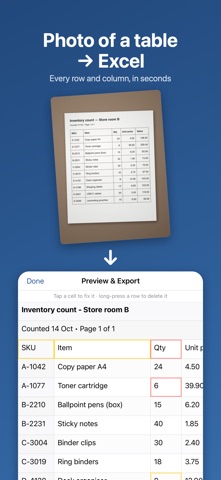
Turn a photo of a table into an Excel spreadsheet, on your iPhone or iPad, in seconds. Snap a printed table, an invoice, a price list or a timetable, or pick a screenshot. QuickScan finds the rows and columns, shows you the result, and exports a clean Excel (.xlsx) or CSV file that opens in Excel, Numbers and Google Sheets. HOW IT WORKS • Scan with the camera, or choose photos and screenshots: several pages at once. • Check the result. Cells QuickScan is unsure about are highlighted. Tap any cell to fix it, long-press a row to delete it. • Export to Excel or CSV and share it: Files, Mail, Numbers, Google Sheets. GOOD AT • Screenshots of spreadsheets and web tables • Printed tables, price lists, timetables and statements • Tables with lines: the lines are used to find every row and column • Commas or points as decimal separators PRIVATE BY DESIGN Your photos are read on your iPhone or iPad. Nothing is uploaded, there is no account and no tracking. That matters for bank statements, invoices and anything else you'd rather not upload. FAIR PRICING Try it on your own tables: 3 exports are free, at full quality and without a watermark. After that, one purchase unlocks unlimited exports. No subscription. LIMITS, HONESTLY Handwriting is often misread, and PDF files aren't opened directly (take a screenshot of the page instead). If a table comes out wrong, send it to us from Settings → Contact. Every email gets an answer.
Business · iPhone, iPad · Free
Rating: 5.0 out of 5, based on 1 user ratings.