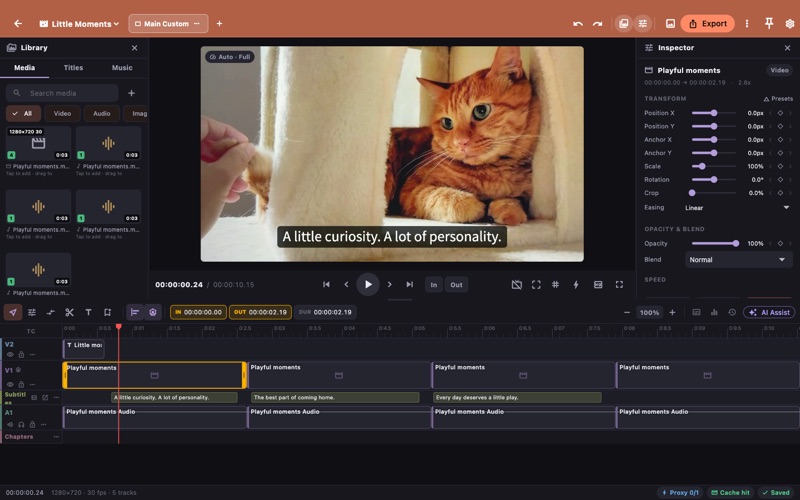
QuickStudio turns what you know into videos everyone can follow. Start from steps. Write each step, attach a clip or a photo, and QuickStudio builds the video: titles, chapters, captions and narration in order. Check before you share. The clarity check flags captions that read too fast, music that drowns the voice, flashing, and on-screen text nobody explains. Describe what is seen. Add audio description in natural pauses using recorded or imported narration. Device voices offer read-aloud previews; audio file generation depends on the platform and voice. Deliver everything at once. Export the video, an illustrated step guide (PDF), captions, audio description and a report, then share from your device. Pick a format for your story: explainer, pet diary, travel vlog or food review. Duplicate and edit scene cards to create custom formats. Formats give you a starting point and leave every timeline tool available. Try three built-in lessons: explain a tool, tell a travel day in photos and voice, and make a video more accessible. Finish in the full multitrack editor with trims, keyframes, transitions, color, audio mixing, AI captions, chapters, Shorts and a publish package. The core workflow runs on your device with no account or upload required. Optional external AI assistance sends data only after you review and approve it. All editing and delivery features are Free. After the seven-day trial, QuickStudio Pro removes mobile ads and desktop reminders with a lifetime purchase or yearly subscription. Terms of Use: https://kakitiro.com/quickapps/quickstudio/terms/
Photo & Video · iPhone, iPad, Android · Free