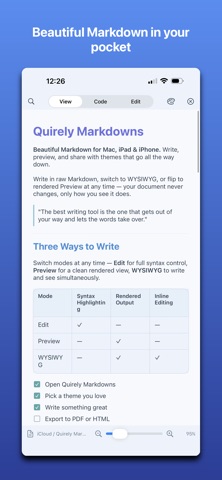
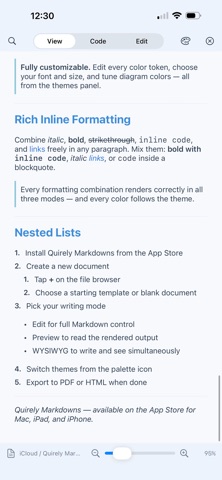
Quirely is two full editors in one native app: real Markdown and real LaTeX. Neither is a bolt-on. If you only ever write Markdown, you get a complete, beautiful Markdown app — nothing hidden behind TeX. If you live in LaTeX, you get a genuine editor that compiles your projects — not a Markdown app with math sprinkled in. A CALMER READER Open a file and just read. Quirely renders clean, typographic Markdown — never forcing a split screen or a cramped editor when all you want is the page. Switch to Code, Edit, or Split only when you choose. Quick Look previews .md and .tex straight from Finder. MARKDOWN, RENDERED RIGHT - Mermaid diagrams: flowcharts, sequence diagrams, and more — live, and styled to your theme. - LaTeX math: inline and block equations, typeset beautifully. - Code blocks with syntax highlighting for dozens of languages. - Tables, task lists, footnotes, callouts, full GitHub-flavored Markdown. EDIT LIKE A PRO - Four modes: View, Code, Edit (block editor), and Split. - Word-processor formatting: bold, italic, underline, strikethrough, highlight, links, super/subscript — with theme-aware colors. - Drag-and-drop block editing: reorder paragraphs, lists, tables, and diagrams by hand. - Visual Mermaid editing: drag nodes, add edges, recolor — no syntax required. - Spreadsheet functions in tables: =SUM(A1:A3), =AVERAGE, =IF and more, with a full function keypad on Mac. - Collaborate over bonjour. Share a workspace or document and each collaborator can edit with their own cursor and view. Entirely private; no external servers A REAL LATEX EDITOR - Open and compile .tex — single files or full projects with a root document, chapters, and BibTeX. - The same four modes: read the typeset PDF, edit raw source with themed syntax highlighting, or use structured Edit mode — rendered paragraphs, equations, and tables you double-click to edit. - Chapters open inline in the root document and save back to their own files. - Tabular grid editor with the same spreadsheet formulas as Markdown tables. - SyncTeX jump between source and PDF; rendered diffs between versions (latexdiff). - Export LaTeX to PDF, HTML, or clean Markdown — cite/ref/figure numbering intact. - LaTeX stays classic black-and-white by default; apply your theme with one toggle. FEYNMAN DIAGRAMS Build QED/QCD diagrams visually — vertices, propagators, gauge bosons, loops — or paste tikz-feynman. Quirely renders them natively and derives the amplitude iℳ from the Feynman rules; edit the equation and get the diagram back. Free on every tier. MAKE IT YOURS Ten hand-tuned themes recolor every token — headings, code, links, tables, diagrams. Duplicate any theme and edit every color, font, and size. Switch live. A REAL WORKSPACE - Open a folder with file navigation, backlinks, and tabs. - Semantic search and exact full-text search. - Version history with rendered diffs. - Mark positions to insert text across documents. ON-DEVICE AI (Pro) Draft, rewrite, and synthesize across your notes with Apple Intelligence — on-device, no API fees, no account. EXPORT & SHARE Polished HTML or paginated PDF with your theme, math, and diagrams intact. PRIVATE BY DESIGN Everything runs on your device. Your files stay plain Markdown and LaTeX you own — no account, no lock-in. ONE APP, EVERY DEVICE Universal for Mac, iPad, and iPhone. One-time purchases — never a subscription. Write in Markdown or LaTeX. Read either beautifully.
Productivity · iPhone, iPad · Free