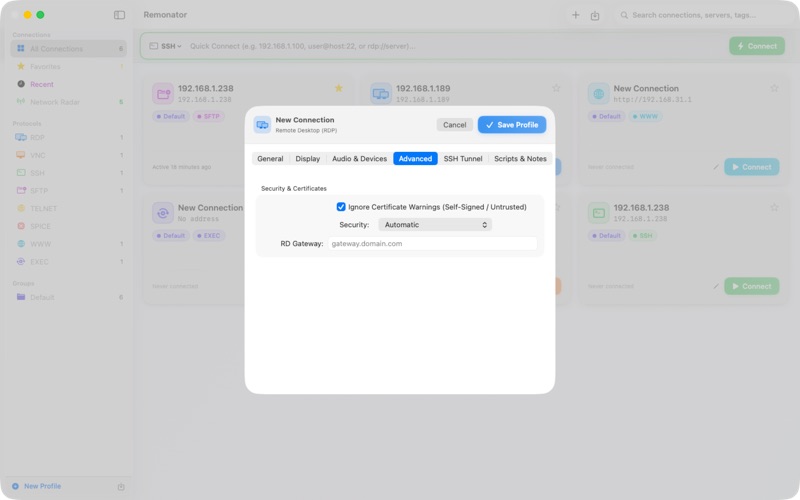
Remonator is a unified remote access client for macOS that brings all your connections together in one place. Connect to remote desktops, servers, and network devices across multiple protocols from a single, native application. SUPPORTED PROTOCOLS • Remote Desktop (RDP) — Connect to Windows desktops and servers with full graphical access, configurable display resolution, colour depth, and performance optimisation. • VNC — Access any VNC-compatible system with support for multiple encodings, adjustable compression and quality, and shared session mode. • SSH — Secure shell access with a built-in terminal emulator supporting password, public key, SSH agent, and Kerberos authentication. • SFTP — Browse, upload, and download files on remote servers with a visual file manager. • Telnet — Connect to legacy systems and network devices. • SPICE — Access virtual machines via the SPICE protocol. • Web — Open browser-based management consoles directly within the app. CONNECTION MANAGEMENT • Organise connections into groups and mark favourites for quick access. • Quick Connect bar lets you connect instantly by typing a server address. • Search and filter connections by name, address, protocol, or tags. • Import and export connection profiles for backup or team sharing. • Bonjour network discovery automatically finds VNC, SSH, SFTP, and RDP servers on your local network. COMPREHENSIVE PROFILE SETTINGS • Save server address, port, username, and credentials for each connection. • Credentials stored securely in the macOS Keychain. • Configure display settings including resolution, colour depth, HiDPI scaling, and multi-monitor support. • Customise desktop experience options such as wallpaper, font smoothing, window animations, and composition. • Set connection speed profiles for optimal performance on any network. • Route SSH and SFTP connections through a bastion host using SSH tunnelling with ProxyJump. SECURITY • Supports password, public key, SSH agent, and Kerberos (GSSAPI) authentication. • Configurable TLS/NLA security modes for RDP connections. • Certificate validation with option to accept self-signed certificates. • RD Gateway support for enterprise environments. • Credentials never leave your device — stored only in the macOS Keychain. REMOTE DESKTOP FEATURES • Full keyboard and mouse input forwarding. • Ctrl+Alt+Delete shortcut for Windows logon screens. • Screenshot capture during sessions. • Dynamic resolution updates when resizing windows. • View-only mode for monitoring without interaction. • Wake-on-LAN to power on remote machines before connecting. • Configurable audio redirection. BUILT FOR macOS • Native macOS application built with SwiftUI. • Sidebar navigation with protocol filtering. • Tabbed interface for managing multiple active sessions. • HUD toolbar overlay for quick session controls. • Custom URL scheme support — open connections from Terminal, scripts, or other apps using rdp://, vnc://, ssh://, and sftp:// URLs. • Pre- and post-connection script execution for automation workflows.
Utilities · iPhone, iPad · $8.99