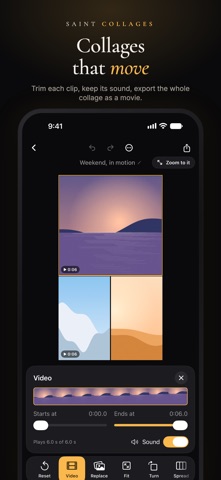
Saint Collages makes photo collages that keep every pixel. Other collage apps shrink your photos on the way in and again on the way out; this one copies each photo exactly as it is, builds the collage from the originals, and exports at the resolution the photos have, up to 200 megapixels. It needs no account, uses no cloud and sends nothing anywhere. Everything happens on your iPhone or iPad. EVERY PIXEL KEPT • Photos are copied byte for byte, never re-encoded, in HEIC, JPEG, PNG, TIFF or RAW • Native export: the size at which no photo is downsampled, and the sheet tells you which photos a smaller size would reduce and which a larger one would enlarge • Inspect any part of the export at its real pixels before it is written • HEIC, JPEG, PNG, 16-bit TIFF and PDF, in Display P3 or sRGB; HDR photos keep their highlights with a gain map • Print sizes at 300 DPI, from a 2 × 6 strip to A3, with bleed and trim marks; print straight to AirPrint • Cut-outs, soft edges, fades and shapes are masks on the original pixels, so they cost nothing OVER TWO THOUSAND LAYOUTS • Grids, polaroids, film strips, taped prints, stamps, photo booth strips, cards, boards, pages, tiles, moments and wallpapers, for 1 to 50 photos • Grids you can bend: drag the gaps, lean the dividers, spread one photo across cells, join cells, or let the rows follow the photos so nothing is cropped • Photos filling a heart, a star, a circle, or a word of your own • Kits for birthdays, weddings, babies, travel, holidays, a year in review, pets, school, sports, food, music and remembrance • Your own layouts, saved from any collage, and the same collage again with other photos MAKE IT YOURS • About 170 drawn stickers, sharp at any size: tape, washi, notes, tags, ribbons, doodles, botanicals, seasons and more, most in any color • Every symbol and emoji, found by name • Text in any font, including yours, with looks like neon, foil, stamp and typewriter, on a curve or in a full circle • Backgrounds of color, gradient, texture, pattern, wash, or a photo, blurred or tiled • Light leaks, grain, vignette, snow, confetti and other effects over the whole picture • Subject cut-outs, made on your device, with a brush to touch them up and a sticker border • Remix: a new look from your photos' own colors in one tap PRIVATE BY DESIGN • No account, no sign-up, no advertising, no analytics • No cloud: your photos are read from your library and never uploaded • No generative AI; the subject cut-out and face-aware placement are Apple's on-device Vision framework • Collages can live in your own iCloud Drive if you choose, and back up to a single file VIDEO TOO • Videos sit in a collage as photos do, kept exactly as recorded, in any frame or shape • Layouts made for video: split screen, side by side, picture in picture, stacks • Trim each clip and choose whether its sound plays • Export as a movie at up to 4K and 60 frames a second, with every photo drawn from its original in each frame • Any collage as a movie: a slow zoom, or its slides one after another AND • Carousels: one wide canvas exported as slides for a swipe post • A profile grid: one picture cut into three, six or nine tiles, numbered in posting order • A Home Screen and Lock Screen widget that shows a collage, or a different one each hour • Versions, undo kept between sessions, Recently deleted for 30 days • Share photos straight from Photos into a new collage
Photo & Video · iPhone, iPad · Free
Rating: 5.0 out of 5, based on 1 user ratings.