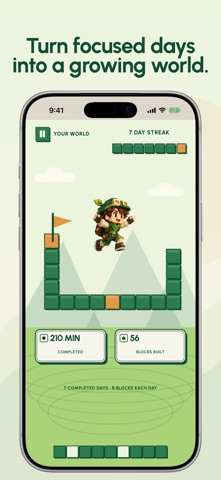
You open one app for a moment. An hour disappears. Paused helps you protect the time you meant to keep. Choose the apps that pull you in, decide when to block them, and build a voxel world from completed focus sessions. TRY A REAL BLOCK During first setup, try one real 15-, 30- or 60-minute block before choosing Paused Plus. Apple Screen Time permission is required. The demo ends automatically at the time shown, whether you buy or not. WITH PAUSED PLUS Ongoing blocking requires paid Paused Plus access through a subscription or one-time lifetime purchase from the plans shown in the app. BLOCK APPS NOW Start a 15-, 30-, 60- or 90-minute block when you need to concentrate. Your selected apps unlock when the timer ends, even if Paused is closed. An active block cannot be stopped early from its own screen. SET AUTOMATIC SCHEDULES Protect work, study, mornings or sleep with repeating schedules. Choose apps and categories, start and end times, and weekdays. Overnight schedules are supported. Each schedule keeps its own app selection. SET A DAILY LIMIT Give selected apps and categories a shared daily allowance. Usage already accumulated today counts. Once the allowance is reached, those selections are blocked for the rest of the day; it resets at midnight. USE A BREAK PASS DELIBERATELY Need a blocked app back? Choose 15, 30 or 60 minutes and hold continuously for 10 seconds. Releasing early keeps protection on. A completed hold uses one pass and ends your current streak, not your permanent world progress. Only the requested app, category or website opens temporarily; other protected selections stay blocked. Switch back to the app yourself after access is granted. Turning off or removing an active schedule or enabled daily limit requires a 10-minute cooldown and confirmation within five minutes. Protection stays on while you wait. BUILD FROM FINISHED FOCUS Your first completed Block now or Schedule session each day earns eight permanent bricks and one streak day. Further sessions add focused minutes and session totals. Daily Limits do not earn bricks or complete the daily reward. Unlock world styles through streak milestones, not purchases. PRIVATE APP SELECTION Apple handles the app picker. Paused does not decode or upload the names of your chosen apps or categories. Blocking setup and world progress are stored on your device. No account registration is required. Made for iPhone and iPad, with Dynamic Type, VoiceOver and Reduce Motion support. Screen Time permission is required for blocking. Restore purchases is available. Subscriptions renew automatically unless cancelled; manage them through the app’s subscription controls. Lifetime access is a one-time purchase, not a subscription. Terms of Use: https://paused.app/terms Privacy Policy: https://paused.app/privacy
Productivity · iPhone, iPad · Free
Rating: 4.8 out of 5, based on 4 user ratings.