
Screenshots



About Seed: Daily Planner & Focus
Plan your day without jumping between a to-do list, a calendar and a focus timer. Seed brings your tasks, events, habits and notes into one calm planner for iPhone.
SEE WHAT FITS IN YOUR DAY
Keep tasks beside appointments in Agenda, Day, Week and Month views. Use project colors to recognize your work at a glance and calendar colors to tell events apart.
MAKE YOUR OWN CALENDARS
Create a calendar for family, birthdays or personal plans inside Seed. Add all-day or timed events, repeats and reminders. Device calendar access is optional: connect existing iPhone calendars when you want to see them alongside your plans.
CAPTURE AN IDEA BEFORE IT GOES
Type an action naturally, with its date, priority or tag. Keep it in your Inbox, schedule it, or break it into smaller steps.
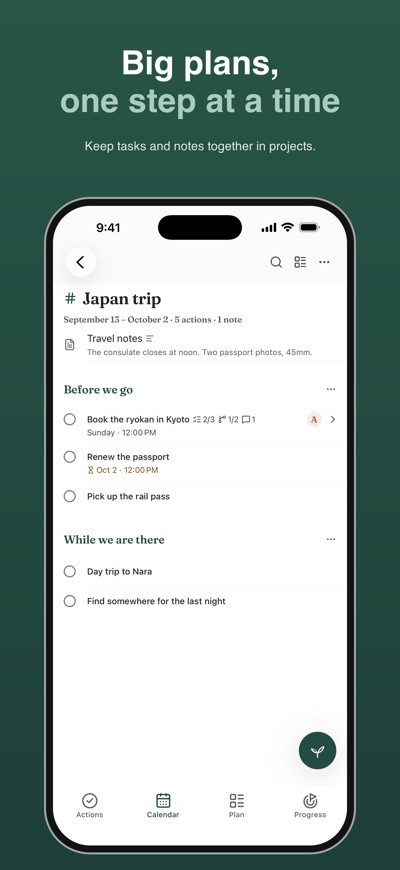
KEEP BIG PLANS ORGANIZED
Bring related actions together in projects and areas. Choose a list, board, timeline or calendar view. Link work to your goals without losing its project color.
BUILD HABITS AND MAKE TIME TO FOCUS
Track daily or weekly habits and use a Pomodoro or focus timer for one thing at a time. Look back on your sessions and progress without adding more work to your day.
KEEP THE DETAILS CLOSE
Save notes, attach pictures and files, and keep useful information with your projects.
YOUR PLAN, YOUR CHOICE
Sign in with email, Apple or Google to back up and sync your Seed content. Calendar and notification permissions are optional. Choose which device calendars to display and which reminders to receive. Export your data or delete your account in Settings.
A compact layout, light and dark appearances, and no ads. Start with one action and make room for what matters.
AVALW Coverage
Not yet mentioned in AVALW articles.
Similar apps


 MyJio: For Everything JioJio Platforms LimitedTrue 5G, recharges, payments & UPI, music & movies, backup, games, news & more.★ 4.4 27428k


 Microsoft WordMicrosoft CorporationThis application requires a qualifying Microsoft 365 subscription. Microsoft 365 includes premium Word, Excel, and PowerPoint apps, 1 TB cloud storage in OneDri★ 4.8 17535k



 Samsung NotesSamsung Electronics Co, Ltd.(Samsung Notes is optimized for Samsung Galaxy Books. Other computers may have issues running it.) "Samsung Notes allows you to use the enhanced S Pen to write ★ 4.8 15228k



 ChatGPT ClassicOpenAIThe official ChatGPT desktop app brings you the newest model improvements from OpenAI. Do more on your PC with ChatGPT: · Instant answers—Use the [Alt + Space] ★ 4.8 11034k


 ChatGPTOpenAI OpCo, LLCIntroducing ChatGPT for iOS: OpenAI’s latest advancements at your fingertips. This official app is free, syncs your history across devices, and brings you the l★ 4.8 11034k


 Microsoft OutlookMicrosoft CorporationOutlook helps you stay connected and organized at the office and at home with easy access to emails, files, calendar events, and contacts across all your accoun★ 4.3 10673k


 Turbo VPN: Unlimited VPN ProxyINNOVATIVE CONNECTING PTE.LIMITEDDo you want online security and privacy while browsing? Turbo VPN now provides the fastest, reliable and encrypted network. With Turbo VPN, you can get the safe★ 4.7 10243k



 Microsoft ExcelMicrosoft CorporationThis application requires a qualifying Microsoft 365 subscription. Microsoft 365 includes premium Word, Excel, and PowerPoint apps, 1 TB cloud storage in OneDri★ 4.8 9702k
More by this developer


 MIND — Act on OverthinkingEvelina OgorodnicOverthinking something? MIND helps you turn what's on your mind into one small step you can actually take. Write it down. A sentence is enough. If it helps, put-


 Execution: 12 Week GoalsEvelina OgorodnicMost goals don't fail from lack of ambition. They fail in the ordinary weeks — the ones where nothing feels urgent and nobody is watching. Execution is a twelve★ 5.0 1