
Screenshots


About Sheet Music Finder
Find classical piano music that fits your mood and skill level.
Sheet Music Finder is a library of 814 piano pieces. Each piece is tagged by feel, color, tempo, speed, composer, and difficulty — filter down to exactly what you want to play.
Browse your way
Filter by feel (Peaceful, Romantic, Dramatic, Joyful, Melancholic, Energetic), color (Warm, Cool, Bright, Dark), tempo, speed, composer, or difficulty. Combine filters to narrow the list.
Read, listen, and play
• Open clean PDF sheet music directly in the app
• Preview any piece with built-in MIDI playback
• Save favorites and build your personal repertoire
• Print or share scores directly from the app
• Use auto-scroll on iPhone to follow the music hands-free
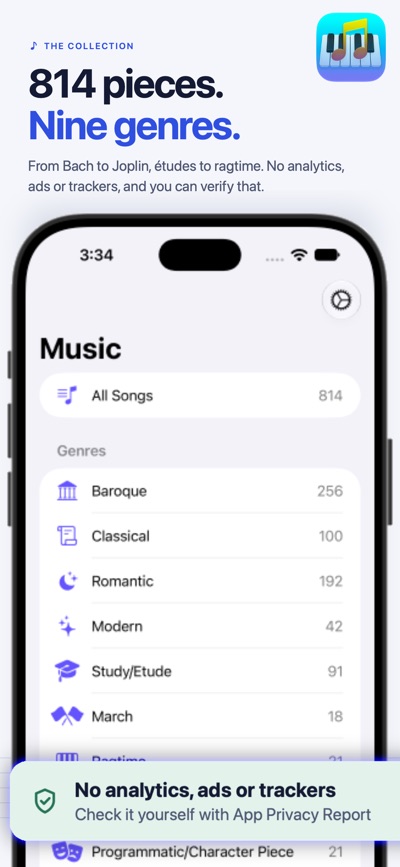
The collection
814 pieces across Classical, Étude, March, Ragtime, Folk, Hymn, Opera/Aria, Ballet, and Programmatic genres. Composers include Bach, Beethoven, Chopin, Schumann, Joplin, Satie, and more. Difficulty ranges from Novice to Advanced.
Available on iPhone, iPad, and Mac.
How it started
Sheet Music Finder was built as a university level educational discovery tool first. The original goal was simple: browse classical piano repertoire by feel, skill level, and style, then take that shortlist to a physical book or continue searching online. That remains the heart of the app. Over the course of development, a catalogue of PDF scores and MIDI versions grew from nothing to cover over 814 pieces — but finding the right piece to learn is still what the app is designed for.
The iPhone version exists for the same reason — to let you browse and shortlist pieces wherever you are, ready to revisit on iPad or Mac later. That said, we've done our best to make the iPhone experience stand on its own, with auto-scroll and display controls designed for the smaller screen.
Privacy you can verify.
Our apps do not use third-party analytics, advertising SDKs, tracking SDKs, data brokers, or third-party service connections. We encourage every user to turn on Apple’s App Privacy Report to compare this for themselves.
To enable App Privacy Report on iPhone or iPad, open Settings > Privacy & Security > App Privacy Report > Turn On App Privacy Report. After you use the app iOS will show the network domains contacted by the app.
For our apps, expected network activity should be limited to Apple-operated services needed for normal App Store, iCloud, device, or system functionality.
We believe privacy claims should be inspectable, not merely promised.
AVALW Coverage
Not yet mentioned in AVALW articles.
Similar apps



 Duolingo - Language LessonsDuolingo Inc.Learn a new language with the world’s most-downloaded education app! Duolingo is the fun, free app for learning 40+ languages through quick, bite-sized lessons.★ 4.7 5492k


 Duolingo: Language LessonsDuolingoLearn a new language, chess & more with the world's most downloaded education app! Duolingo is the fun, free app for learning 40+ languages through quick, bite-★ 4.7 5492k


 Read Along by GoogleGoogle LLCLearn to read with the magic of your voice and a friendly reading buddy★ 4.6 5287k


 Brainly: AI Homework HelperBrainlyQuick Math Helper & Science Solutions | Get Homework Answers for School Doubts★ 4.5 4470k


 Gauth: AI Study CompanionGauthTech Pte. Ltd.Ask anything, get right answer★ 4.8 2111k


 Remind: School CommunicationParentSquareRemind is a communication platform that helps every student succeed. Whether you're in the classroom, at home, or anywhere in between, Remind makes it easy to s★ 4.8 1799k


 Memrise: Fun language lessonsMemriseImprove vocabulary & learn to speak English, Spanish, German, Japanese & more!★ 4.4 1571k


 ClassDojoClassDojoClassDojo connects teachers, tutors, kids, and families★ 4.8 1341k
More by this developer


 Nested UplistNope Dragon LCNestedUplist is more than a to-do list. It is a flexible planning app built to help you turn big goals into clear next steps. Use it for everyday tasks, long-te-


 Undercast Weather AetherNope Dragon LCUndercastWeather Aether delivers forecasts alongside on-device, model-enhanced predictions you can compare side by side. In the United States those forecasts co-


 PDF Quick CompressNope Dragon LCPDF Quick Compress makes PDFs smaller without making them worse. Drop a file on the window or the Dock icon and get back a lighter copy that still looks like th-


 Audio RewaveNope Dragon LCAudioRewave is a fast, focused audio format converter for Mac, iPhone, and iPad. Drop in your audio files, choose a format, and convert — no subscription, no up★ 5.0 1