
Screenshots


About Shelf Launch for Xcode
Shelf Launch is a Mac tool for app developers who want a faster way to manage Xcode projects and create app marketing content.
Find and open Xcode projects visually from the menu bar, then turn app launches, updates, release notes, milestones and promotions into polished static or animated social media posts.
Build faster. Share better.
Manage your Xcode projects from the menu bar
When Xcode's recent projects list is no longer enough, Shelf Launch gives you a visual place to keep the projects you actually work on.
Choose your main projects folder and Shelf Launch builds a scannable project library using your app icons, helping you recognize projects without digging through folders or relying on file names.
• Open Xcode projects from the Mac menu bar
• See projects visually using their app icons
• Sort projects by recently edited
• Reveal any project in Finder
• Refresh when your project folder changes
• Hide names and icons with privacy blur
• Keep projects close while working across Xcode, Finder and Terminal
Shelf Launch makes it easier to find an old Xcode project and get back to work.
Keep active projects on your desktop with Shelfie
Shelfie is a floating project shelf for up to six recent projects.
Right-click a project to open it, reveal it in Finder, hide its details or open Shelf Launch Studio.
Switch Shelfie to Developer Tools mode for quick access to Xcode, Icon Composer and other development utilities.
Create app launch and update posts
Shipping the app is only part of the work. You still need to tell people what changed.
Shelf Launch Studio turns the project and app icon you already have into ready-to-share app marketing content.
Choose what happened, select a design, customize the details and export.
Launch
Create an app launch announcement for a new release or pre-order.
Update
Turn release notes, changelogs and new features into a clear app update post ready to share when your new version goes live.
Milestone
Share how long your app has been in development and celebrate important development milestones.
Promotion
Create promotional graphics for coupon codes, discounts, introductory offers and win-back offers.
Turn release notes into social media posts
Instead of copying release notes into a generic design tool, use Shelf Launch to present an app update in a format designed for sharing.
Highlight what changed, show your app icon and create a consistent update announcement for your audience.
Export for different social platforms
Shelf Launch can export each design in up to four social-ready formats, helping your app launch, update or promotion look considered wherever you share it.
Create animated app marketing without a video editor
Shelf Launch Motion turns static designs into animated promotional content without keyframes, timelines or a complicated video editing workflow.
Enable Motion, choose how expressive you want the animation to feel and export.
• Animated patterns designed for each template
• Optional shimmer across your app icon
• Adjustable pattern and shimmer speed
• 6, 12 or 24 second looping animations
• Fade or staged text entrance animations
Create an animated app launch post, update announcement or promotion without rebuilding everything in a separate motion graphics tool.
App marketing built for developers
Shelf Launch connects two parts of building apps that are usually separated.
Find and open the Xcode project you want to work on, then use that same project to create marketing material for the launch, update, milestone or promotion.
No need to rebuild your app identity every time you want to post.
Private and offline
Shelf Launch does not collect your project data.
Your projects and marketing workflow stay on your Mac, with no account required to get started.
Open the project. Ship the update. Share what you built.
https://www.apple.com/legal/internet-services/itunes/dev/stdeula/
AVALW Coverage
Not yet mentioned in AVALW articles.
Similar apps


 Canva Configurator (BYOD)CanvaThe Configurator app allows Canvanauts to configure internal settings of Canva's iOS app, such as server target and client flags.★ 4.8 27857k



 ChatGPTOpenAIChatGPT is your everyday AI assistant for Windows. Use Chat to ask questions, explore ideas, write, learn, and work through everyday tasks. When you need to go ★ 4.8 11034k

 Remote Tools for Microsoft EdgeMicrosoft CorporationRemote Tools for Microsoft Edge enables developers to debug live web content running on remote Windows desktop, Xbox, and HoloLens devices. This app extends Win★ 4.7 1610k


 TestFlightAppleTestFlight makes it easy to test beta versions of apps and App Clips to provide valuable feedback to developers before they release their apps on the App Store.★ 4.7 791k


 Holy Quran Offline ReadingJedyAppsAl QURAN-القرأن الكريم app to read Quran offline just like an actual Quran book★ 4.4 207k


 Galaxy S9 Plus RingtonesZenTint CreationsDownload The 100 Best Galaxy S9+ Ringtones & Notifications For Free★ 4.6 135k


 Quran Pro - القران الكريمQuanticapps FZ LLERead and listen to the Holy Quran Offline. MP3 recitations & Tafsir★ 4.7 124k


 IGAMES PS2IGames BRThe best PS2 games from your childhood come to life in their mobile version!★ 4.4 56k
More by this developer


 BookTeleport: eBook TransferDaniel MiaraBookTeleport makes it easy to move your own e-books from your Mac to a USB-connected e-reader. Choose a book or simply drag it into the app. BookTeleport prepar-

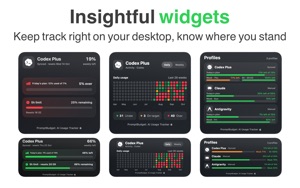

 PromptBudget: AI Usage TrackerDaniel MiaraPromptBudget helps developers pace a weekly AI usage allowance from the Mac menu bar using a compact menu app, detailed or the main app. Keep your computer awak-


 Connect My NASDaniel MiaraConnect your NAS without the usual setup hassle. Connect My NAS keeps the folders you use on your network storage available and reconnects them automatically wh-


 Spin & Draw: Drawing GuesserDaniel MiaraTurn any table into a drawing game night. Spin & Draw is a pass-the-phone drawing and guessing game for 2–6 players. Grab some paper, a notebook or a whiteboard-