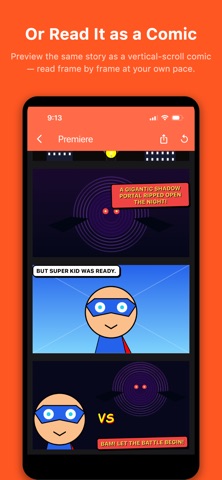
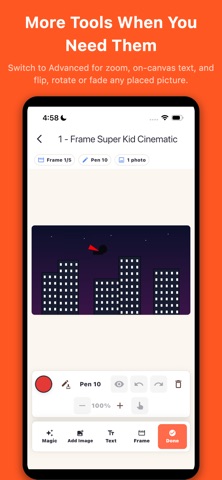
Sketudio is where your drawings start to move. Sketch a scene, bring it to life with motion and sound, add speech bubbles and your own voice, then share the whole story as a single file that plays in any web browser — no app required on the other end. Sketudio is a draw-first storytelling studio. You build your story one frame at a time, exactly the way you imagine it, and Sketudio turns those frames into a cinematic comic you can play and share. DRAW EVERY SCENE YOUR WAY - Sketch with pen and color tools, pick your frame shape (square, wide, or tall) - Drop in photos from your library as backgrounds - Cut out the subject from any photo you import — the background is removed on your device - Add captions and text labels with built-in text tools - Start in Simple mode, or switch to Advanced for canvas zoom, layered photos, and on-canvas text BRING IT TO LIFE WITH MAGIC - Add cinematic motion — zoom, pan, and playful spins - Layer in sound effects and screen flashes - Add speech, thought, shout, and narration bubbles - Record your own voice, or generate on-device English speech for any bubble MAKE IT INTERACTIVE - Turn a frame into a choice — show two buttons and let your reader pick which frame to jump to - Mark a frame as an ending so every branch of your story can finish its own way - Build branching, choose-your-own-adventure comics that play right in a browser PLAY IT TWO WAYS - Animated Comic: scene-by-scene autoplay with motion, flashes, sound, and bubble reveals - Comic: a vertical-scroll page where every scene is visible at once SHARE WITH ANYONE - Export to a single self-contained file that keeps your motion, timing, audio, and bubbles in one shareable story - The person you send it to just opens it in any browser. No account, no app, no sign-up - Keep every export in your Exports Library to replay, re-share, or reopen later - Back up or move a whole project as a single file — export it to JSON and re-import to pick up right where you left off PRIVATE BY DESIGN - Your comics, drawings, photos, and voice clips stay on your device - Works fully offline — create anywhere, no internet needed - No accounts, no ads, no tracking Whether you're sketching a quick gag strip or directing a multi-scene animated comic, Sketudio gives you the studio — you bring the story. Start with the built-in "How to Use Sketudio" walkthrough and make your first comic right away.
Photo & Video · iPhone, iPad · Free
Rating: 4.0 out of 5, based on 1 user ratings.